The Hidden Data Structure Behind Undo and Redo
Phase 1: The Problem — Ctrl+Z Feels Simple and Isn’t
Every engineer has, at some point, tried to build undo functionality by just… saving the previous value of a variable somewhere. It works for about ten minutes. Then someone asks “what about redo after undo,” and then “what if the user edits three different things and wants to undo just the second one,” and then “what if two people are editing the same document at the same time” — and the ten-minute solution collapses completely, because undo was never actually the simple feature it looks like from the outside.
The reason it looks simple is that the interface is simple: one keyboard shortcut, one obvious expected behavior. But the interface hides a genuinely hard problem, which is that undo requires your application to maintain a coherent, navigable history of every meaningful change to its state — not just the current state, which is all most applications naturally keep track of. A typical program is built to answer “what is true right now?” Undo requires answering a completely different question: “what was true a moment ago, and how do I get back there without breaking anything that happened since?”
This gets harder fast once you look at what real applications actually need. A text editor doesn’t want to undo one character at a time when you paste a thousand-word paragraph — that would take a thousand undo presses to reverse a single paste. A design tool like Figma needs undo to work sensibly even when multiple people are editing the same canvas simultaneously, where “the previous state” isn’t even a well-defined single thing anymore, because two different collaborators might have conflicting ideas of what happened in what order. A version control system like Git needs something that behaves like undo/redo but where the “history” isn’t even a straight line — it branches, merges, and needs to support jumping to any point, not just stepping backward and forward one step at a time.
This is why undo/redo, despite feeling like a UI nicety, is actually one of the more instructive data structures problems in application engineering: the naive solution (keep a stack of full previous states) works for toy examples and falls apart on every dimension that matters in production — memory usage, granularity of what counts as “one action,” and multi-user correctness. Understanding how real systems actually solve this teaches you something that generalizes far beyond undo buttons: how to model state changes as a first-class, inspectable, reversible sequence of events rather than a single mutable blob that quietly overwrites its own history.
Phase 2: The Mental Model — Stop Storing States, Start Storing Changes
The single mental shift that unlocks this whole topic is moving from thinking about snapshots to thinking about operations.
A snapshot-based mental model says: every time something changes, save a full copy of the entire application state. To undo, pop the most recent snapshot off a stack and restore it. This is intuitive, and it’s exactly the trap most people fall into first, because it seems obviously correct. The problem becomes visible the moment you think about scale: if a document is 50 megabytes and a user makes 200 edits in a session, storing 200 full snapshots means potentially gigabytes of memory for something that should cost almost nothing, since most of those 200 edits changed a tiny fraction of the document.
The operation-based mental model instead says: don’t store what the state was — store what changed, as a small, self-contained, reversible instruction. Instead of “here is a full copy of the document before this edit,” you store “the user inserted the word ‘quickly’ at position 402” — a few bytes, not megabytes — along with enough information to reverse it (“to undo, delete 7 characters starting at position 402”).
This is the same intuition behind how a bank statement works, and it’s a genuinely useful analogy. A bank doesn’t store your balance as a series of full snapshots at every second — it stores a ledger of transactions (deposits and withdrawals), and your current balance is simply the result of replaying that ledger from the start. If you want to know your balance yesterday, you don’t need a saved snapshot from yesterday — you reconstruct it by replaying the ledger up to that point. Undo/redo systems work the same way: the “current state” is really just the result of replaying a sequence of small, recorded operations, and undo means “stop replaying one operation earlier”; redo means “replay one operation further.”
This reframing is what’s formally known as the command pattern combined with the memento pattern — two classic object-oriented design patterns that, together, describe almost every serious undo implementation. The command pattern says: represent every user action as an object with a do() method and an undo() method, rather than executing the action as an anonymous, unrecorded side effect. The memento pattern supplements this for cases where an operation genuinely can’t cleanly describe its own reverse (some transformations aren’t easily invertible in isolation) by capturing just enough of the “before” state to restore it, without needing to snapshot everything.
Once you see undo as “a list of reversible command objects” rather than “a list of saved states,” the entire internal architecture in Phase 3 becomes a fairly natural set of engineering decisions rather than a mysterious black box.
Phase 3: Internal Working Deep Dive — From Keystroke to History Stack
3.1 The Basic Two-Stack Architecture
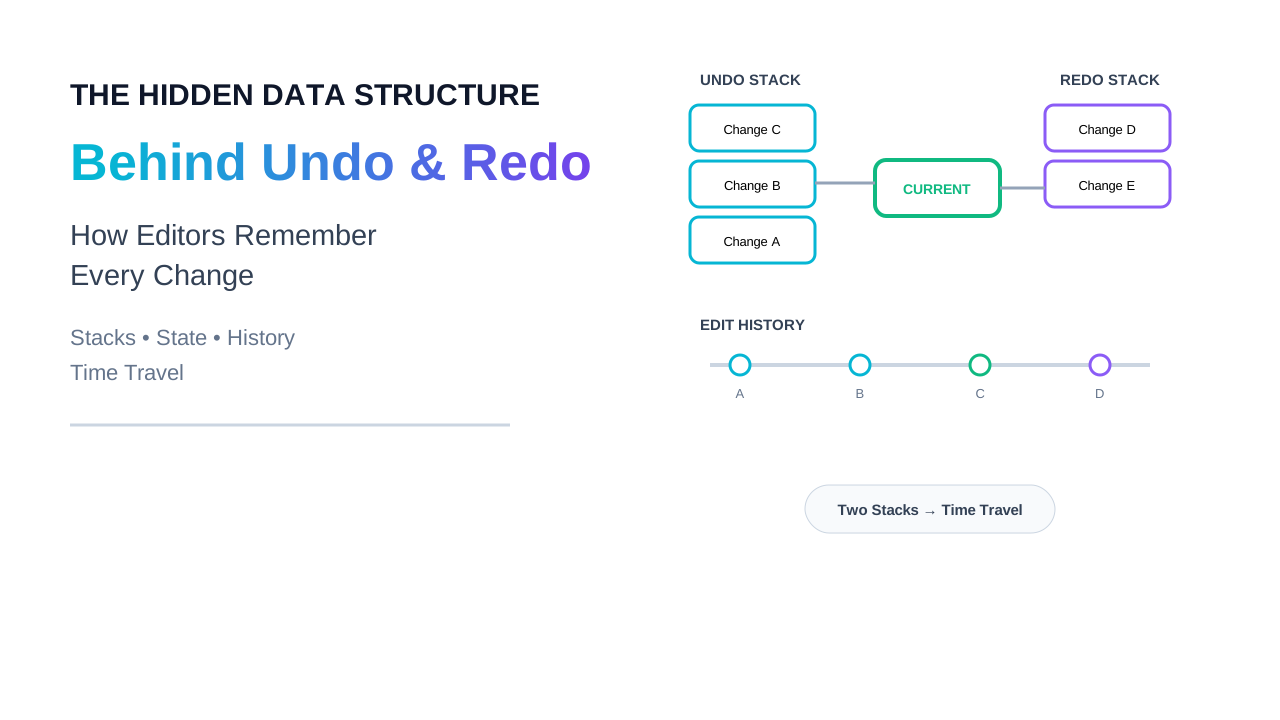
The foundational structure behind almost every simple undo system is two stacks: an undo stack and a redo stack.
When the user performs an action, three things happen. First, the action executes and changes the actual application state. Second, a command object representing that action — holding enough information to reverse it — gets pushed onto the undo stack. Third, and this is the step beginners often miss, the redo stack gets cleared entirely. This third step matters because once you take a genuinely new action after undoing something, the old “future” you could have redone no longer makes sense — you’ve created a new branch of history, and keeping the stale redo entries around would let a redo silently reapply an action that’s no longer consistent with the current state.
When the user presses undo, the top command is popped off the undo stack, its undo() method runs to reverse the state change, and — critically — that same command gets pushed onto the redo stack rather than discarded. This is what makes redo possible at all: redo isn’t a separate mechanism, it’s just “replay a command we previously reversed.”
When the user presses redo, the top command is popped off the redo stack, its do() method runs again, and it goes back onto the undo stack — exactly mirroring the undo operation. This symmetry is precisely why the two-stack model is so clean: undo and redo are the same operation running in opposite directions across two stacks that trade commands back and forth.
3.2 The Granularity Problem — What Actually Counts As “One Action”
Here’s where real systems diverge sharply from toy examples. If every single keystroke pushed its own command onto the undo stack, undoing a sentence you just typed would take as many key presses as it took to type it — which is not what any user actually wants or expects. Real text editors solve this with operation coalescing (sometimes called batching or grouping): consecutive, related keystrokes within a short time window and without an intervening cursor jump get merged into a single undoable unit, so that undo reverses “the sentence you just typed,” not “the last letter you typed.”
This coalescing logic has to make a judgment call about where the boundaries are, and the rules matter more than they might seem: typing continuously merges into one undo step, but moving the cursor elsewhere, pausing for a noticeable interval, or performing a different kind of action (like a paste or a formatting change) starts a new undo group. Get this wrong in either direction and the product feels broken — group too aggressively and users lose fine-grained control; group too little and undo becomes tedious to the point of being useless.
3.3 Beyond a Straight Line — The Undo Tree
The two-stack model has a structural limitation worth naming directly: it assumes history is linear. Undo, then take a new action, and the old redo branch is gone forever — that’s the “clear the redo stack” step from 3.1. But some applications, particularly code editors, deliberately don’t want that. If you undo three times, then make a new edit, then realize you actually wanted one of those undone changes back, a purely linear model has already destroyed it.
This is solved with an undo tree instead of two stacks: rather than a straight line of commands, history is modeled as a tree, where each edit creates a new child node from the current position, and undoing simply moves you to the parent node without ever destroying the branch you moved away from. Redo, in this model, isn’t “replay the one thing I just undid” — it becomes “choose which child branch to move back into,” since there can now be more than one. This is a genuinely more powerful model, and it’s precisely the model used by advanced text editors like Vim (in plugins implementing undo trees) and, conceptually, it’s the same shape of data structure as Git’s commit graph — which is not a coincidence, since Git is, at its core, a very sophisticated undo/redo/branch system for a file tree rather than a single document.
3.4 The Multi-User Problem — When “Undo” No Longer Has a Single Timeline
Everything above assumes a single user acting on a single timeline. Collaborative tools like Figma or Google Docs break that assumption completely, and this is where undo/redo stops being a data-structures problem and becomes a distributed-systems problem.
Imagine two people editing the same document. User A types a sentence. At nearly the same moment, User B, working from a slightly stale view of the document (because their last update from the server hasn’t arrived yet), deletes a paragraph that included a section User A just edited. If User A now presses undo, what should happen? A naive two-stack model, running purely locally, would try to reverse User A’s last operation — but the document has been changed underneath them by User B’s deletion, so blindly reapplying a stored “reverse this insertion” command might not even apply cleanly to the document as it currently exists.
This is solved with the same class of technique that makes real-time collaborative editing possible at all: either Operational Transformation (OT), the technique historically used by Google Docs, which mathematically transforms an operation against every other operation that happened concurrently so it can still apply correctly to the current state, or CRDTs (Conflict-free Replicated Data Types), a newer and increasingly popular approach used by tools like Figma’s multiplayer engine, which structure the data itself so that operations from different users can be merged in any order and always converge to the same final result without needing a central authority to referee conflicts.
The undo-specific consequence of this is important and often surprising to engineers first encountering it: in a genuinely collaborative system, “undo” usually doesn’t mean “restore the exact previous byte-for-byte state” — it means “generate a new operation that semantically reverses my last operation, expressed in terms of the document as it exists right now,” which then gets transformed or merged through the same collaborative machinery as every other edit. Undo, in other words, stops being a special local-only mechanism and becomes just another operation flowing through the same conflict-resolution pipeline as everything else — which is precisely why building undo correctly into a collaborative tool from day one is dramatically harder than bolting it onto a single-user application later.
Phase 4: Engineering Implementation — A Command-Pattern Undo Manager
The following is a realistic sketch of the command-pattern architecture from Phase 3.1–3.2, with the reasoning behind each decision made explicit.
class Command:
    """Base class: every reversible action implements do() and undo()."""
    def do(self):
        raise NotImplementedError

    def undo(self):
        raise NotImplementedError

    def can_coalesce_with(self, other):
        # Default: no automatic merging. Specific commands
        # (like text insertion) override this to allow grouping
        # consecutive keystrokes into a single undo step.
        return False


class InsertTextCommand(Command):
    def __init__(self, document, position, text, timestamp):
        self.document = document
        self.position = position
        self.text = text
        self.timestamp = timestamp

    def do(self):
        self.document.insert(self.position, self.text)

    def undo(self):
        # Store enough info to precisely reverse the insertion —
        # this is the memento-pattern piece: we don't snapshot
        # the whole document, just what's needed to undo THIS action.
        self.document.delete(self.position, len(self.text))

    def can_coalesce_with(self, other):
        if not isinstance(other, InsertTextCommand):
            return False
        # Only merge typing that's contiguous in both time and
        # position — this is what makes "type a sentence, undo once"
        # feel right instead of undoing one character at a time.
        adjacent_position = other.position == self.position + len(self.text)
        recent_enough = (other.timestamp - self.timestamp) < 0.8
        return adjacent_position and recent_enough


class UndoManager:
    def __init__(self):
        self.undo_stack = []
        self.redo_stack = []

    def execute(self, command):
        command.do()

        # Try to coalesce with the previous command instead of
        # always pushing a new entry — this is what keeps the
        # undo stack from growing one entry per keystroke.
        if self.undo_stack and self.undo_stack[-1].can_coalesce_with(command):
            self.undo_stack[-1].text += command.text
        else:
            self.undo_stack.append(command)

        # A genuinely new action invalidates any "future" the user
        # could have redone — keeping it around would let redo
        # reapply a command that no longer makes sense.
        self.redo_stack.clear()

    def undo(self):
        if not self.undo_stack:
            return
        command = self.undo_stack.pop()
        command.undo()
        self.redo_stack.append(command)

    def redo(self):
        if not self.redo_stack:
            return
        command = self.redo_stack.pop()
        command.do()
        self.undo_stack.append(command)
The most common production mistake in code like this isn’t the stack logic itself — it’s forgetting to clear the redo stack on a new action, which silently produces one of the most confusing bug classes in undo systems: a user undoes something, does something unrelated, then hits redo and watches an old, now-inconsistent action reapply itself to a document it no longer matches, sometimes corrupting state in ways that are hard to trace back to this exact root cause.
Phase 5: Real-World Systems — How This Plays Out at Scale
Google Docs popularized Operational Transformation as the mechanism underlying both real-time collaboration and, crucially, collaboration-aware undo — every keystroke from every user is treated as an operation that gets transformed against concurrent operations from other users before being applied, which is also exactly the mechanism that lets an individual user’s undo behave sensibly even while other people are simultaneously editing the same paragraph.
Figma made a deliberate, publicly-discussed architectural choice to use a CRDT-based approach rather than OT for its multiplayer engine, largely because CRDTs simplify a genuinely hard class of edge case around network partitions and out-of-order message delivery — a client can go offline, keep making local edits (each pushed onto its own local undo stack as usual), and reconnect later, with the CRDT machinery guaranteeing those edits merge deterministically with everyone else’s changes without a central server needing to resolve every conflict in real time.
Version control systems, Git chief among them, are worth understanding as undo/redo’s most sophisticated real-world descendant. A commit is conceptually a command object frozen in time; git revert is undo expressed as a new forward-moving commit rather than a destructive rewrite (a deliberate design choice, since destructively rewriting shared history is dangerous in a distributed, multi-user system — exactly the same lesson from Phase 3.4 about collaborative undo needing to be expressed as new operations rather than raw state restoration); and branching is the undo-tree model from Phase 3.3 taken to its logical conclusion, where “undo” and “explore an alternate history branch” are treated as fundamentally the same operation.
Design and creative tools broadly — Photoshop, Figma, and Blender among them — have to solve a version of the coalescing problem from Phase 3.2 that’s considerably harder than text editing, because a single user action (like dragging a shape) can generate hundreds of intermediate state updates per second as the mouse moves, and naively pushing an undo entry per frame would make undo useless. These tools instead commit a single undo entry only once a gesture completes (on mouse-up, for instance), treating everything in between as an uncommitted, continuously-updated draft of that one eventual command.
Phase 6: AI-Era Relevance — Undo as a Safety Mechanism for Agents
This is where undo/redo stops being a UI nicety and becomes directly relevant to one of the central open problems in AI engineering: giving autonomous agents the ability to take actions in the real world (editing files, calling APIs, modifying databases) without those actions being irreversible mistakes.
An AI coding agent that edits a dozen files as part of a multi-step task is, structurally, doing exactly what the command pattern in Phase 3.1 describes — except each “command” is a much larger, riskier operation than a single keystroke, and the model deciding to execute it can be wrong in ways a human typist rarely is (a confidently incorrect refactor applied across an entire codebase, for instance). The same core insight from Phase 2 — store operations, not just resulting states, and make every operation reversible — is precisely the design principle behind giving agents a safe “undo” of their own actions, and it’s why serious agentic coding tools increasingly checkpoint state before an agent executes a batch of changes, specifically so a bad multi-step agent run can be rolled back cleanly rather than requiring a human to manually reconstruct what the codebase looked like before the agent started.
This connects directly to a broader and increasingly important theme in agent design: reversibility as a first-class safety property. An agent that can only move forward — that has no structured way to undo its own actions — is considerably more dangerous to give autonomy to than one built from the ground up around the same command/memento thinking described in this article, because the cost of a mistake is completely different when “undo” is a guaranteed, well-tested capability versus something that has to be improvised after the fact. This is also precisely why agent frameworks are increasingly borrowing version-control-style thinking (Phase 5’s Git discussion) — treating an agent’s action history as a navigable, branchable timeline rather than a single irreversible sequence of side effects — for exactly the same reasons Git treats commits that way for human developers.
The undo tree from Phase 3.3, in particular, maps unusually well onto agent workflows: an agent exploring multiple possible approaches to a task is structurally identical to a user undoing to an earlier point and branching off in a new direction, and systems that let an agent (or the human supervising it) freely navigate between these branches — rather than being stuck with whichever path was taken most recently — are meaningfully safer and more useful than ones that only support a single linear timeline.
Phase 7: Advantages, Limitations, and Honest Trade-offs
Advantage — the command pattern makes undo cheap in both memory and reasoning. Because you’re storing small, targeted operations instead of full snapshots, memory usage scales with the number and size of changes, not the size of the document — a genuinely important property for any application working with large files or documents, where snapshot-based undo would be memory-prohibitive within minutes of real use.
Limitation — not every operation is cleanly invertible. Some transformations lose information in a way that makes a perfect, symmetric undo() genuinely difficult to write — a lossy image filter, for instance, or a batch operation that merges duplicate records. In these cases, real systems fall back to the memento pattern (storing just enough “before” state to restore it) rather than trying to force every operation into the command pattern’s clean symmetric shape, which is a legitimate trade-off between memory efficiency and implementation simplicity that has to be made case by case.
Trade-off — coalescing granularity is a genuine design decision with no universally correct answer. Group too aggressively and users lose the fine-grained control they expect; group too little and undo becomes tediously slow to use. Different applications land in different places on this spectrum deliberately — a code editor tends to favor finer granularity than a casual note-taking app, because developers more often want to selectively undo one specific small change without losing everything else they typed since.
Limitation — collaborative undo fundamentally cannot guarantee “restore exactly what I had before,” once other users are involved. This is a hard limitation, not an implementation gap: once concurrent edits from other users are part of the picture, “my previous state” isn’t even a well-defined single thing to restore to. Every collaborative tool has to make peace with undo meaning “semantically reverse my last change, expressed against the document as it exists now” rather than the simpler, single-user guarantee — and communicating that distinction well to users, so undo doesn’t feel broken or surprising in a multiplayer context, remains a genuinely unsolved UX problem across the industry.
Phase 8: Career Impact — Why This Shows Up in Interviews and Real Systems
Undo/redo is a favorite systems-design and data-structures interview topic precisely because it’s deceptively simple on the surface and genuinely deep underneath — an interviewer asking you to “design an undo system” is really testing whether you reach for the command pattern instinctively, whether you think to ask about coalescing and granularity unprompted, and whether you’re aware that the problem changes shape entirely once multiple users enter the picture. Candidates who jump straight to “I’ll keep a stack of previous states” without being prompted toward the operation-based model typically haven’t built anything at this scale before — and that’s exactly the signal the question is designed to surface.
Beyond interviews, this pattern shows up constantly in real engineering work outside of literal undo buttons: event sourcing (an entire architectural style built around the same “store operations, not just current state” insight, widely used in financial and audit-heavy systems where you need a full, replayable history of what happened and why), database write-ahead logs (which exist for exactly the same reason — durability and recoverability through a replayable operation log rather than trusting a single mutable state), and, as covered in Phase 6, the emerging discipline of building safe, reversible AI agents. Understanding undo/redo deeply is really understanding one specific, well-scoped application of a much bigger idea: modeling change explicitly, as data, rather than letting it happen invisibly and irreversibly.
What to learn next, if this area is interesting: study event sourcing and CQRS (Command Query Responsibility Segregation) as the “grown-up,” production-system version of exactly the same ideas in this article, and separately, look directly at Git’s internal object model — commits, trees, and refs — as the most battle-tested real-world undo tree in existence.
Phase 9: Final Thoughts — Undo Was Never About the Keyboard Shortcut
What Ctrl+Z actually represents, underneath the single keystroke, is a discipline: refusing to let your application’s state change silently and irreversibly, and instead treating every meaningful change as a small, well-defined, storable, reversible fact. That discipline is what makes a two-stack undo manager in a text editor and Git’s entire branching model, at a much larger scale, the same idea wearing different clothes — and it’s the same discipline that will increasingly determine whether the AI agents being given real autonomy over real systems in 2026 and beyond are trustworthy or dangerous to rely on.
The next time undo just works — silently reversing exactly the right thing, even in a document three other people are editing at the same moment — it’s worth remembering that “just working” is the result of a genuinely hard, deliberately engineered structure underneath: a history of operations, not states, curated carefully enough that stepping backward through it never breaks anything that came after. That’s a small piece of engineering, hiding behind two keys on a keyboard, that turns out to explain a surprising amount about how to build systems — human-facing or autonomous — that you can actually trust to make mistakes safely.