Undo Redo Data Structure: How Ctrl+Z Really Works, from Two Stacks to Undo Trees
You press Ctrl+Z forty times while refactoring, then type one wrong character, and the thing you wanted to redo is gone for good. That behavior comes from a specific data-structure choice, and other editors made a different one.
In this post, you will build undo/redo from scratch with two stacks and the command pattern. You will trace it on a real example and extend it into a Vim-style undo tree. You will also see why collaborative editors can’t use the simple version, and which interview problems test this pattern.
Phase 1: The Problem
You are building a text editor. A user types, deletes, pastes, and wants to go back. The first idea most people have is the obvious one: before every change, copy the whole document and push the copy onto a list. Undo means restoring the last copy.
This works, and it is correct. It is also expensive. Take a 200 KB source file and 5,000 edits in a session. Storing a full copy per edit costs about 200 KB × 5,000 = 1 GB of memory, for a file you could fit in a browser tab. In big-O terms, snapshots cost O(n) per edit in both time and space, where n is the document size. The cost grows with the document, even though the change was one character.
The second problem is subtler. A snapshot tells you what the document looked like, but not what the user did. You can’t merge “typed five letters quickly” into one undo step, or show “Undo Delete Paragraph” in a menu, because there is no action to name.
What you want is a history whose cost scales with the size of each change, not the size of the document. That means recording operations instead of states, and picking a structure that makes “most recent first” cheap.
Phase 2: The Pattern
Recognize it when: a problem says “revert,” “go back,” “undo the last operation,” “history,” “most recent first,” or “backtrack.” Browser back/forward buttons are the same pattern.
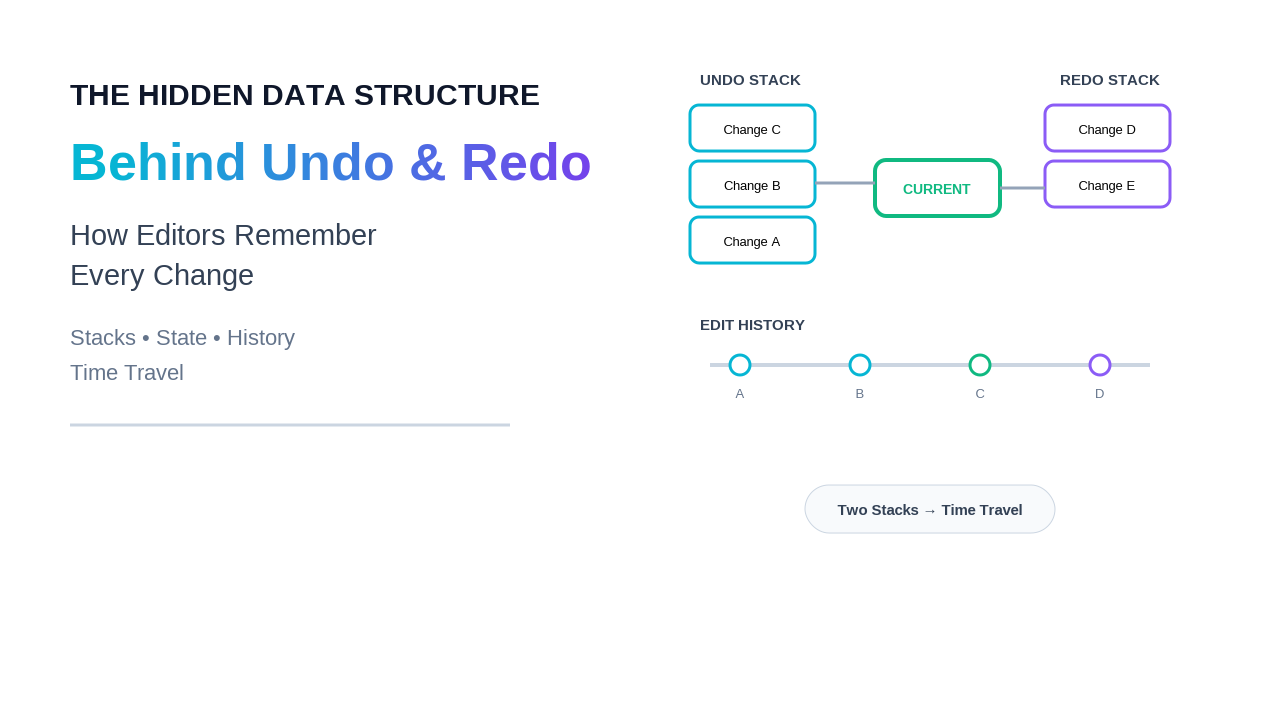
Think of your edit history as a trail of breadcrumbs through the forest of possible documents. Each edit drops a crumb. Undo walks you back along the trail, one crumb at a time. This analogy is the thread for the rest of the post.
The core structure is a stack, because the next thing you undo is always the last thing you did. It’s last-in, first-out. A stack alone isn’t enough, though. When you undo, the crumb you picked up has to go somewhere in case you want to walk forward again. That second place is another stack, the redo stack.
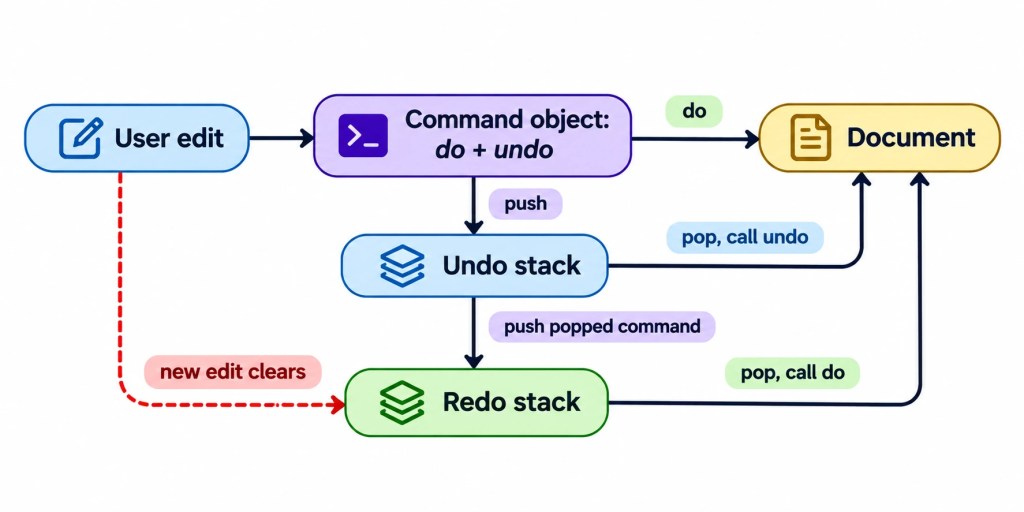
Each entry on the stack is a command: a small object that knows how to apply a change and how to reverse it. This is the command pattern. The alternative, storing whole-state snapshots, is the memento pattern. Commands cost memory proportional to the change. Mementos are simpler but cost memory proportional to the state.
What most tutorials get wrong: they present the two stacks as a data-structure trick and stop there. The real story is two invariants hiding underneath.
- A command’s undo is only valid in the exact state right after its do. Insert “abc” at position 5, and undo means “delete 3 characters at position 5.” That is only correct if the document is exactly what it was right after the insert. That is why the history must be a stack, undone strictly in reverse order. Undo command #3 before #5 and every stored position is wrong.
- Clearing the redo stack on a new edit destroys data. Undo three times, type one character, and those three states become unreachable. Most tutorials write
redo_stack.clear()without mentioning that it silently deletes the user’s work. It’s a design decision, and Phase 5 shows editors that decided differently.
Phase 3: Step-by-Step Walkthrough
Here is a dry run with the document starting empty. I is an insert command and D is a delete command.

Step 7 is the data loss. The redo stack held D3, and a fresh edit invalidated it. Without that clear, D3’s stored position and text would no longer match the document, and redoing it could corrupt the text.
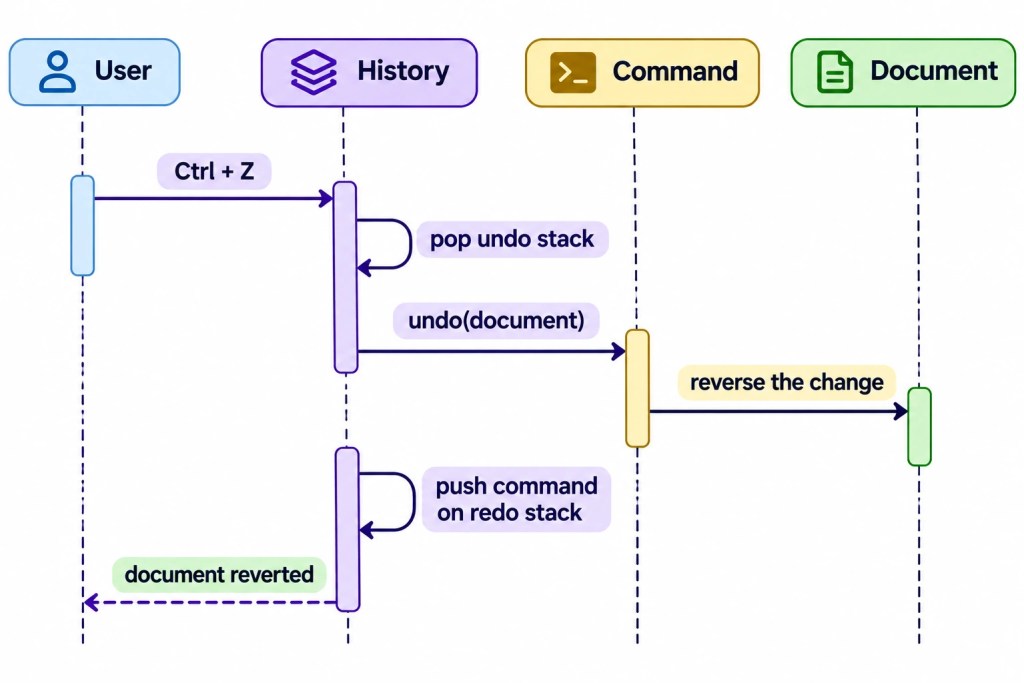
The full flow of one undo, step by step:
- The user presses Ctrl+Z, and the history checks whether the undo stack is empty. If it is, nothing happens.
- It pops the top command, because the most recent change is the first one to reverse.
- It calls the command’s
undomethod on the document. The command contains everything it needs: position, text inserted or removed. - It pushes that command onto the redo stack, so the user can walk forward again.
- The document is now in the state it had before the command ran.
Phase 4: Code Templates
Python (standard library only, Python 3.8+)
from collections import deque
from dataclasses import dataclass


@dataclass
class Document:
    text: str = ""


@dataclass
class Insert:
    pos: int
    s: str

    def do(self, d: Document) -> None:
        d.text = d.text[:self.pos] + self.s + d.text[self.pos:]

    def undo(self, d: Document) -> None:
        d.text = d.text[:self.pos] + d.text[self.pos + len(self.s):]


@dataclass
class Delete:
    pos: int
    removed: str  # captured when the command is created

    @classmethod
    def capture(cls, d: Document, pos: int, n: int) -> "Delete":
        return cls(pos, d.text[pos:pos + n])

    def do(self, d: Document) -> None:
        d.text = d.text[:self.pos] + d.text[self.pos + len(self.removed):]

    def undo(self, d: Document) -> None:
        d.text = d.text[:self.pos] + self.removed + d.text[self.pos:]


class History:
    def __init__(self, doc: Document, limit: int = 1000):
        self.doc = doc
        self.undo_stack = deque(maxlen=limit)  # oldest entries fall off
        self.redo_stack = []

    def run(self, cmd) -> None:
        cmd.do(self.doc)
        self.undo_stack.append(cmd)
        self.redo_stack.clear()

    def undo(self) -> bool:
        if not self.undo_stack:
            return False
        cmd = self.undo_stack.pop()
        cmd.undo(self.doc)
        self.redo_stack.append(cmd)
        return True

    def redo(self) -> bool:
        if not self.redo_stack:
            return False
        cmd = self.redo_stack.pop()
        cmd.do(self.doc)
        self.undo_stack.append(cmd)
        return True


if __name__ == "__main__":
    doc = Document()
    h = History(doc)
    h.run(Insert(0, "hello"))
    h.run(Insert(5, " world"))
    h.run(Delete.capture(doc, 6, 5))
    print(repr(doc.text))   # 'hello '
    h.undo(); print(repr(doc.text))   # 'hello world'
    h.undo(); print(repr(doc.text))   # 'hello'
    h.redo(); print(repr(doc.text))   # 'hello world'
    h.run(Insert(11, "!")); print(repr(doc.text))  # 'hello world!'
    print(h.redo())         # False: redo history was cleared
What problem it solves: O(1) history bookkeeping per edit, with memory proportional to the size of each change instead of the whole document.
Key parts: Delete.capture reads the text before deleting, because you can’t restore what you never saved. deque(maxlen=...) gives a bounded history for free. run clears the redo stack, which is the Step 7 behavior from the trace.
Production notes: push/pop are O(1) time. Total history space is O(sum of command sizes). The Python string slicing here is O(n) per edit, so a real editor swaps the document for a rope or piece table (Phase 8) and keeps the same history layer. Commands must be undone in strict reverse order. Anything that changes the document outside the history (a “revert file” action, an external reload) must clear both stacks.
C++17
#include <cstddef>
#include <deque>
#include <memory>
#include <string>
#include <utility>

struct Document { std::string text; };

struct Command {
    virtual ~Command() = default;
    virtual void apply(Document&) = 0;
    virtual void revert(Document&) = 0;
};

struct Insert : Command {
    std::size_t pos; std::string s;
    Insert(std::size_t p, std::string str) : pos(p), s(std::move(str)) {}
    void apply(Document& d) override { d.text.insert(pos, s); }
    void revert(Document& d) override { d.text.erase(pos, s.size()); }
};

struct Delete : Command {
    std::size_t pos; std::string removed;  // captured at creation
    Delete(std::size_t p, std::string r) : pos(p), removed(std::move(r)) {}
    void apply(Document& d) override { d.text.erase(pos, removed.size()); }
    void revert(Document& d) override { d.text.insert(pos, removed); }
};

class History {
    Document& doc_;
    std::deque<std::unique_ptr<Command>> undo_, redo_;
    std::size_t limit_;
public:
    explicit History(Document& d, std::size_t limit = 1000) : doc_(d), limit_(limit) {}

    void run(std::unique_ptr<Command> c) {
        c->apply(doc_);
        undo_.push_back(std::move(c));
        redo_.clear();
        if (undo_.size() > limit_) undo_.pop_front();
    }
    bool undo() {
        if (undo_.empty()) return false;
        auto c = std::move(undo_.back()); undo_.pop_back();
        c->revert(doc_);
        redo_.push_back(std::move(c));
        return true;
    }
    bool redo() {
        if (redo_.empty()) return false;
        auto c = std::move(redo_.back()); redo_.pop_back();
        c->apply(doc_);
        undo_.push_back(std::move(c));
        return true;
    }
};
Complexity: run, undo, and redo are O(1) for the stack operations. std::string::insert and erase are O(n) in the worst case, which is the same document-structure caveat as in Python.
Phase 5: Variations
1. Grouping (coalescing) small edits. Nobody wants 200 undo steps for a 200-character sentence. Editors merge rapid edits into one step. Vim lets you break and group undo blocks, with CTRL-G u as the manual break in insert mode. The Emacs manual describes “amalgamating” commands, where small commands such as character insertion get a boundary only every 20th command. The Yjs UndoManager merges edits within a 500 ms window by default and lets you call stopCapturing() to force a break. Example: wrap several commands in a Group command whose do and undo loop over its children (undo in reverse).
2. Bounded history. The deque(maxlen=...) in the template is the simplest version. Vim exposes the same idea as the undolevels option. Trade-off: you can’t undo past the limit, so pick it based on the memory cost of your commands.
3. The undo tree. Instead of clearing the redo stack, keep every branch. Section below.
4. Undo as an edit (the Emacs approach). Emacs treats undo itself as an undoable change, so “redo” means undoing a previous undo. Nothing is ever lost, but the model confuses many users, which is why add-on packages exist that layer a conventional redo on top.
5. Local undo in a shared document. Covered in Phase 6.
The undo tree in code
The breadcrumb analogy extends naturally. When you walk back three crumbs and drop a new one, a stack sweeps the old crumbs away. A tree leaves them where they are and forks the trail.
from dataclasses import dataclass, field


@dataclass(eq=False)
class Node:
    seq: int
    cmd: object = None
    parent: "Node | None" = None
    children: list = field(default_factory=list)


class UndoTree:
    def __init__(self, doc: Document):
        self.doc = doc
        self.root = Node(0)
        self.cur = self.root
        self._seq = 0
        self._by_seq = {0: self.root}

    def run(self, cmd) -> None:
        cmd.do(self.doc)
        self._seq += 1
        node = Node(self._seq, cmd, self.cur)
        self.cur.children.append(node)  # old branches stay attached
        self.cur = node
        self._by_seq[node.seq] = node

    def undo(self) -> bool:
        if self.cur.parent is None:
            return False
        self.cur.cmd.undo(self.doc)
        self.cur = self.cur.parent
        return True

    def redo(self) -> bool:
        if not self.cur.children:
            return False
        node = self.cur.children[-1]  # simplification: newest branch
        node.cmd.do(self.doc)
        self.cur = node
        return True

    def goto(self, seq: int) -> None:
        """Jump to any state: undo up to the common ancestor, then redo down."""
        target = self._by_seq[seq]
        path, n = [], target
        while n is not None:
            path.append(n)
            n = n.parent
        on_path = {n.seq for n in path}
        while self.cur.seq not in on_path:
            self.undo()
        idx = path.index(self.cur)
        for node in reversed(path[:idx]):
            node.cmd.do(self.doc)
            self.cur = node


if __name__ == "__main__":
    doc = Document()
    t = UndoTree(doc)
    t.run(Insert(0, "A"))    # state 1: "A"
    t.run(Insert(1, "B"))    # state 2: "AB"
    t.run(Insert(2, "C"))    # state 3: "ABC"
    t.undo()                 # back to "AB"
    t.run(Insert(2, "D"))    # state 4: "ABD", a new branch
    print(doc.text)          # ABD
    t.goto(3)
    print(doc.text)          # ABC, still reachable
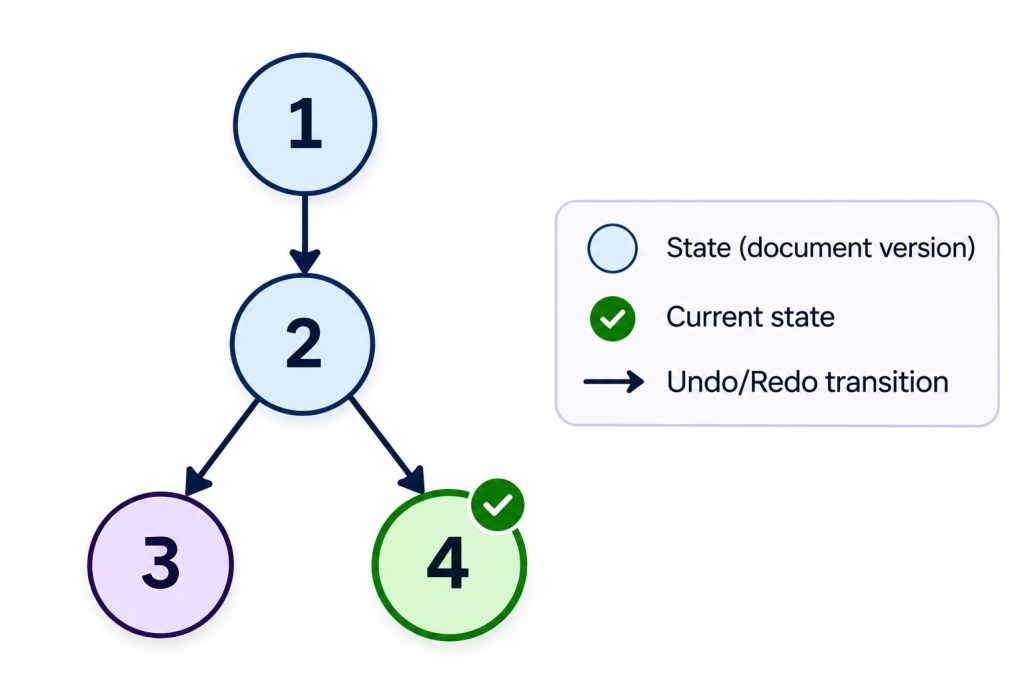
What problem it solves: a new edit after an undo no longer destroys the abandoned future.
Key parts: each node holds one command and a parent pointer. goto finds the common ancestor of the current and target nodes, undoes up to it, then redoes down the target’s path. That keeps every command applied in a state where it is valid, which is invariant #1 from Phase 2.
Production notes: the tree never shrinks on its own, so you need a retention policy (prune old branches, cap depth, or persist to disk). Vim persists undo history across sessions via its undo-persistence feature. The children[-1] rule is a simplification. Real editors define more careful rules for which branch redo follows.
Vim’s two navigation modes make a good model for your UI. In Vim, u and Ctrl-R walk the branch you’re on, while g- and g+ walk states in chronological order across all branches. :undolist lists the leaves of the tree.
Phase 6: Practice Problems
Easy to hard.
- Baseball Game (682, Easy). A “C” token cancels the previous score. Hint: this is undo on a stack in disguise.
- Valid Parentheses (20, Easy). Hint: push openers, pop to match. Most-recent-first again.
- Min Stack (155, Medium). Hint: store the running minimum alongside each pushed value so pops restore it in O(1).
- Design Browser History (1472, Medium). Hint: back and forward are the undo and redo stacks. Visiting a new URL clears forward history, exactly like Step 7.
- Simplify Path (71, Medium). Hint: “..” is an undo of the last directory.
- Decode String (394, Medium). Hint: stack of (count, partial string) frames.
- LRU Cache (146, Medium). Hint: not a stack, but “most recent first” ordering is the same idea; compare the data structure.
- Design a Text Editor (2296, Hard). Hint: cursor-based insert and delete, and the strings on each side of the cursor map to two stacks.
- Largest Rectangle in Histogram (84, Hard). Hint: the monotonic stack is a stack that pops while a condition holds, a close cousin of undo.
For a deeper look at stack and queue cost analysis, see the complete guide to time and space complexity.
Phase 7: Common Mistakes and Edge Cases
- Capturing deleted text at undo time. By then it’s gone. Capture it when you create the command, as
Delete.capturedoes. - Forgetting to clear the redo stack on a new edit. The stale redo commands carry positions that no longer match the document, and redoing them corrupts text.
- Recording the undo itself as a new command. If
undocallsrun, you get an infinite history. Keepdoandrunseparate. - Off-by-one in slicing.
s[:pos] + x + s[pos:]inserts before indexpos. Test inserts at 0 and atlen(s). - Empty stacks.
undoandredoon empty stacks must return quietly. Test them first. - Unicode positions. Python indexes by code point, JavaScript strings by UTF-16 code unit, and users think in grapheme clusters. A position stored in one unit and applied in another breaks on emoji.
- Unsigned underflow in C++.
pos - nwithsize_twraps to a huge number whenn > pos. Validate before subtracting. - Actions that can’t be undone. “Save” or “send” shouldn’t pretend to be reversible. Either clear the stacks or mark a barrier so users can’t undo past it.
- Unbounded history. A long-lived session with large paste commands grows without limit. Cap by count or by total bytes.
Phase 8: Where This Appears in Real Systems
Vim. Vim keeps history as a tree. The manual describes branches forming when you undo some changes and then make a new one, and you can reach the abandoned branch with g- and g+ or jump by change number with :undo N.
Emacs. Emacs records edits in an undo list with boundary markers, and the primitive-undo function applies entries from it. Undo actions are themselves recorded, so you undo an undo rather than redo. Visual tools like vundo reconstruct a tree from that linear list.
VS Code and the piece table. VS Code’s team replaced an array-of-lines text buffer, in release 1.21 (March 2018). They started from a piece table, which keeps an original buffer and an append-only buffer of added text, plus a list of pointers into both. Memory use is close to the document size plus the added text. This connects to undo through my own inference, not a VS Code claim: because the two buffers are append-only, an older document state is just an older list of pointers, which makes snapshot-style history cheap. I did not verify how VS Code’s undo stack is implemented, so I’m not claiming it works this way.
Yjs. In collaborative editing, a global undo stack is wrong: pressing Ctrl+Z shouldn’t undo a collaborator’s typing. The Yjs UndoManager tracks only changes whose transaction origin you register, and by default tracks local changes. When you undo, it applies the reverse operation and puts it on the redo stack. Its docs also show a way to store the cursor position on each stack item so undo can restore it.
Advantages, Limitations, and Trade-offs
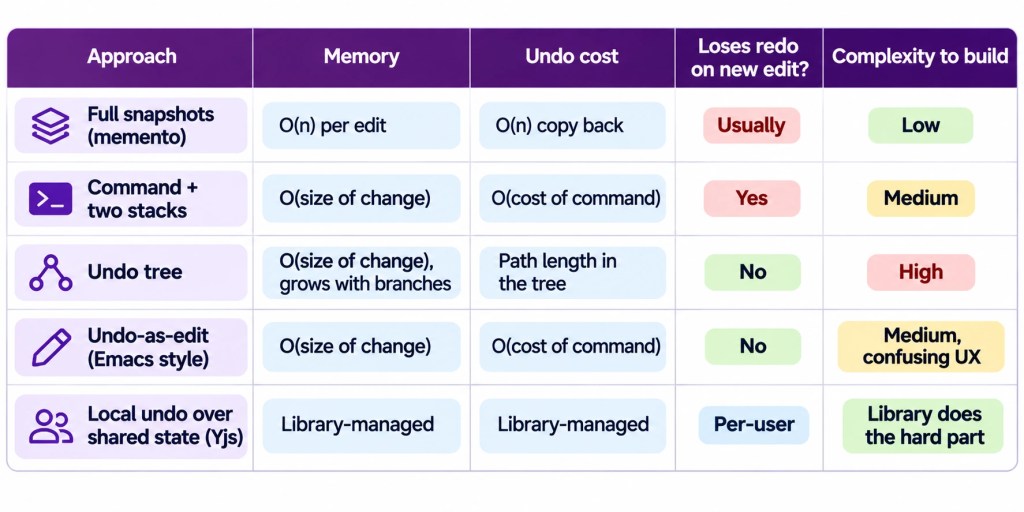
Where commands are bad: every action needs a correct inverse, and writing inverses for complex operations (reformat a file, apply a refactor) is error-prone. A pragmatic hybrid is to use commands for small edits and a snapshot for heavy operations.
Where snapshots are bad: large documents, as Phase 1 showed.
Where the tree is bad: users need a way to see branches. Without a visualization, a tree is a hidden feature nobody finds.
Relevance in the AI Era and Career Impact
AI coding tools apply many edits at once, often across several files, so “undo the agent’s last change” has to be a first-class operation. This is my engineering reasoning, not a claim about any specific product. If you evaluate tools, one useful question is whether an agent’s multi-file edit lands as one grouped undo step or dozens of tiny ones. See the comparison of AI coding assistants for the broader picture.
The same pattern shows up for editor and IDE infrastructure, design tools, CAD, spreadsheets, games with move history, and any workflow with “revert.” It’s also a standard low-level design interview topic. Related reading: the trie behind autocomplete is another “hidden” structure inside editors, and the BST implementation guide helps with the tree-with-parent-pointers mechanics. If you’re planning a path into these roles, the AI career roadmap lays out the skills.
Interview questions where this appears:
- Design undo/redo for a text editor. Which data structures, and what happens to redo on a new edit?
- Command pattern vs. memento pattern for undo: when do you choose each?
- LeetCode 1472, Design Browser History: how do back and forward map to stacks?
- How would you design undo in a real-time collaborative editor?
- LeetCode 2296, Design a Text Editor: how do you support cursor movement and deletion efficiently?
Key Takeaways
- Undo/redo is two stacks of commands: pop from one, apply, push onto the other.
- Store operations, not whole states, so memory scales with the change instead of the document.
- A command’s inverse is only valid in the exact state right after it ran, which is why history must be undone in strict reverse order.
- Clearing the redo stack on a new edit silently destroys data. An undo tree avoids that.
- Capture the data you’ll need to reverse a command (such as deleted text) when you create it.
- Group fast typing into single undo steps, and cap history size.
- In collaborative editing, undo must be per-user, not a global stack.
FAQ
What data structure is used for undo and redo?
Two stacks. The undo stack holds applied commands, and the redo stack holds commands you’ve undone. Undo pops from the first and pushes onto the second, and redo does the reverse.
What is the difference between the command pattern and the memento pattern for undo?
Command stores the operation and its inverse, so memory scales with the change. Memento stores a snapshot of state, which is simpler but scales with document size. Many systems combine them.
Why does redo stop working after I make a new edit?
Most editors clear the redo stack when you edit after undoing, because the stored commands no longer match the document. Editors with an undo tree, such as Vim, keep those states reachable instead.
How does undo work in collaborative editors?
Each user gets their own undo history that tracks only their own changes. Libraries like Yjs do this by tracking transaction origins, so Ctrl+Z reverses your edits and not a collaborator’s.
How much memory does an undo history use?
With commands, roughly the total size of all stored changes. With full snapshots, roughly document size times the number of edits, which is why snapshots get expensive for large files.