A Connector Problem at Civilizational Scale
In November 2024, Anthropic quietly open-sourced a specification with an unglamorous name: the Model Context Protocol. There was no flashy product launch, no consumer-facing app, just a GitHub repository and a handful of reference servers for things like GitHub, Slack, and Postgres. Eighteen months later, that quiet release has become one of the most consequential pieces of AI infrastructure built since the transformer itself — adopted not just by Anthropic’s own products, but by OpenAI, Google, Microsoft, and AWS, and now governed by a neutral foundation under the Linux Foundation rather than any single company.
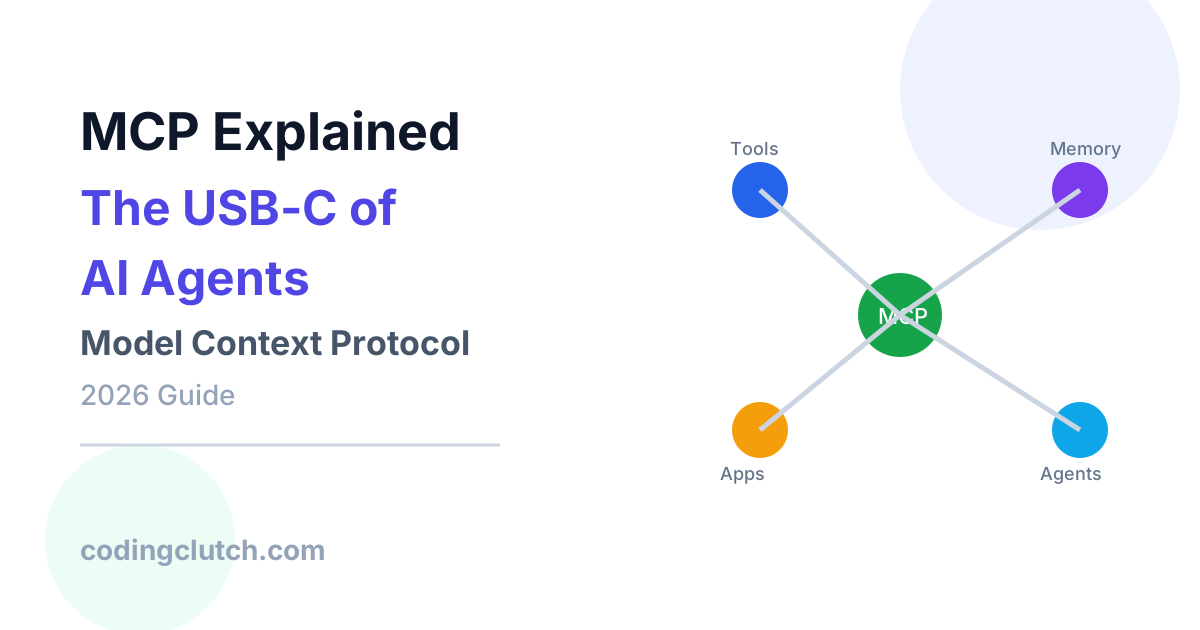
If you’ve spent any time around AI engineering circles in 2026, you’ve heard MCP described as “the USB-C of AI.” That nickname isn’t marketing fluff — it’s a remarkably precise technical analogy, and understanding why it’s precise is the fastest way to understand what MCP actually does and why it matters.
This article builds MCP from the ground up: the integration nightmare it was built to solve, the host-client-server architecture underneath it, exactly what happens on the wire when a model calls a tool, how to build a real server yourself, how the biggest AI labs in the world have adopted it, and where the protocol — which is undergoing its largest revision since launch as of mid-2026 — is heading next.
Phase 1: The Problem — The M×N Integration Nightmare
Before MCP: Function Calling Without a Standard
To understand why MCP had to exist, rewind to 2023 and 2024. Large language models had gained a genuinely useful capability called function calling (or tool use): you could describe a function in a JSON schema, hand that schema to the model alongside a user’s question, and the model could decide to “call” that function by emitting structured arguments instead of plain text. This was a real breakthrough — it’s how AI assistants first learned to check the weather, query a database, or send an email instead of just talking about doing those things.
But function calling, on its own, was missing something crucial: a standard way to package, distribute, discover, and connect those functions to an AI application. Every team building an AI product had to write its own bespoke integration code for every external system it wanted the model to touch. Want your AI assistant to read from GitHub? Write a custom GitHub connector. Want it to also query a Postgres database? Write another custom connector, with its own auth handling, its own error formatting, its own way of describing available operations to the model. Want it to read Slack messages too? Write a third, completely separate connector.
The M×N Problem
Engineers who lived through this era have a name for the resulting mess: the M×N integration problem. If you have M different AI applications (Claude Desktop, a custom internal chatbot, an IDE assistant, a customer support bot) and N different tools and data sources those applications might need to touch (GitHub, Slack, Postgres, Google Drive, an internal CRM, a ticketing system), then without a shared standard, you don’t need M+N integrations — you need something closer to M×N of them, because every application-to-tool pairing is its own bespoke project. A five-tool ecosystem touched by four different AI products isn’t twenty units of straightforward work; it’s twenty different pieces of fragile, inconsistent glue code, each maintained separately, each with its own bugs.
This wasn’t just an annoyance — it actively throttled what AI products could do. Three specific pain points kept showing up across the industry:
Inconsistent everything. Because every integration was bespoke, every team reinvented authentication, error handling, sandboxing, and data formatting from scratch. One connector might fail silently on a bad API call; another might throw a raw stack trace at the model; a third might have no rate limiting at all. There was no shared vocabulary for “how should a tool fail gracefully in a way the model can reason about,” because there was no shared protocol defining what a tool integration should look like in the first place.
No discovery mechanism. A model couldn’t ask “what can you actually do?” in any standardized way. Every application had to hardcode, in its own prompt engineering, exactly which tools existed and how to describe them — meaning the moment you added or removed a capability, you were back into manual prompt surgery rather than the model dynamically discovering what was available.
Tight coupling between app and tool. Because integrations were written directly against a specific AI application’s internal function-calling format, a tool built for one AI product couldn’t be reused by another without being substantially rewritten. The Slack integration you built for your internal chatbot couldn’t be dropped into your IDE assistant without redoing the work, even though conceptually it was the exact same capability: read and send Slack messages.
Why This Mattered More As Agents Got More Capable
These pain points existed quietly for a while because early AI tool use was modest — a chatbot calling one or two functions per conversation. But as models got better at multi-step reasoning and the industry moved toward genuinely agentic systems — AI that plans, takes a sequence of actions, checks results, and adjusts — the number of tools and data sources any single agent might need exploded. An agent doing real engineering work might need access to a code repository, a ticketing system, internal documentation, a database, a deployment pipeline, and a monitoring dashboard, all in the same task. Hand-writing bespoke, inconsistent integrations for each of those, multiplied across every AI application that might want similar capabilities, was not a scalable foundation for the agentic future the industry was clearly building toward.
This is the exact problem MCP was designed to dissolve: instead of M×N bespoke integrations, define one open, shared protocol. Tool and data source builders implement it once, as a server. AI application builders implement it once, as a client. Any MCP-compatible server then works with any MCP-compatible application, with no bespoke glue code required. The math changes from M×N to M+N — and that arithmetic, multiplied across an entire industry, is the real reason MCP went from a quiet GitHub release to something every major AI vendor adopted within about a year and a half.
Phase 2: Building the Mental Model
Why “USB-C” Is the Right Analogy
Before USB-C, every peripheral you owned might need a different physical connector — one cable for your printer, another for your external hard drive, another for your camera, another for your monitor. Manufacturers each built their own proprietary ports because there was no shared standard, and as a result, every device-to-device connection was its own small compatibility puzzle. USB-C didn’t make printers or hard drives or monitors smarter. It standardized the connector — the physical and electrical interface — so that any USB-C device could plug into any USB-C port, regardless of who manufactured either end.
MCP does precisely this for AI. It doesn’t make a language model smarter, and it doesn’t replace the GitHub API, the Slack API, or your internal company database. What it standardizes is the connector — a shared protocol for how an AI application discovers, requests, and receives data and actions from any external system. A tool builder who implements an MCP server doesn’t need to know or care which AI application will eventually connect to it. An AI application that implements an MCP client doesn’t need to write custom code for each tool it might want to use. Both sides build to the same interface, the way both a laptop and a monitor build to the same USB-C interface, and they simply work together.
The Three Participants: Host, Client, Server
MCP’s architecture is built around three distinct roles, and keeping them conceptually separate is the single most important thing to internalize before going deeper.
The Host is the actual application a person interacts with — Claude Desktop, Claude Code, an IDE like Cursor, or a custom-built agent application. The host is responsible for the overall user experience: managing the conversation, deciding which connected capabilities to surface, and orchestrating the language model itself.
The Client lives inside the host and manages exactly one connection to exactly one MCP server. This is a deliberately narrow responsibility — a client doesn’t make decisions about what the model should do; it simply maintains a clean, isolated session with a single server and relays messages back and forth. A host that’s connected to five different MCP servers (say, GitHub, Postgres, Slack, an internal wiki, and a deployment tool) is running five separate client instances internally, each handling exactly one of those connections.
The Server is the external program that actually exposes capabilities — Tools, Resources, and Prompts — and does the real work: querying a database, calling a third-party API, reading a file, executing a calculation. Critically, a server has no idea which host or which underlying language model it’s ultimately serving. It just speaks the protocol.
A Restaurant Analogy for the Message Flow
Here’s a second mental model that makes the client-server relay intuitive: think of the host application as a restaurant, the language model as the customer deciding what to order, and an MCP client as a waiter assigned to one specific supplier — say, the seafood vendor. The waiter doesn’t cook anything and doesn’t decide what the customer wants. Their job is narrow and reliable: relay the customer’s order to the vendor using a standard order ticket format, then bring back whatever the vendor sends, in a standard format the kitchen knows how to use. If the restaurant works with five vendors — seafood, produce, bakery, dairy, wine — it has five waiters, each handling exactly one relationship, all using the same ticket format. The kitchen (the host, orchestrating everything) never has to learn five different ways of placing an order; every vendor relationship looks the same from the kitchen’s point of view, because the ticket format — the protocol — is standardized.
The Three Primitives: Tools, Resources, and Prompts
Once you understand host/client/server, the next conceptual layer is what a server actually exposes. MCP defines three core primitives, and the cleanest way to remember the difference between them is to ask: who is in control of invoking this thing?
Tools are model-controlled. A tool is an executable function the model itself can decide to call, based on its own reasoning about what the user needs — think of tools as verbs: send an email, create a ticket, run a query, write a file. Because the model decides when and how to invoke a tool, tools are the primitive that can have side effects: they can change the state of the world, not just read it.
Resources are application-controlled. A resource is read-only contextual data — file contents, a database schema, recent git history, a document — conceptually similar to a GET endpoint in a REST API. The defining trait of a resource is that the host application, not the model, decides when to fetch and attach it to the conversation. A code editor might automatically attach the currently open file as a resource every time you ask a question, without the model ever “deciding” to request it.
Prompts are user-controlled. A prompt is a pre-written template — often surfaced as something like a slash command — that a human explicitly chooses to invoke, designed to kick off a particular workflow using the server’s tools and resources in an optimal, pre-arranged sequence. Think of a prompt as a recipe: a curated, reusable starting point that a person selects on purpose, rather than something the model reaches for autonomously or the application attaches silently.
This three-way control hierarchy — model-controlled, application-controlled, user-controlled — isn’t an arbitrary classification. It’s a deliberate design decision that maps cleanly onto where trust and intent should sit in an AI system: actions with consequences (tools) are gated by the model’s reasoning and typically a permission check; passive context (resources) is managed by the application’s own logic; and curated workflows (prompts) require explicit human initiation. Once this distinction is internalized, the entire deep-dive section that follows is simply an elaboration of how these three primitives move across the wire.
Phase 3: Internal Working Deep Dive — What Actually Happens on the Wire
This is the largest section of the article, and deliberately so: understanding MCP’s internals is what separates someone who can describe the protocol in a sentence from someone who can debug a broken server connection or design a new one well.
The Communication Substrate: JSON-RPC 2.0
Every message exchanged between an MCP client and server is a JSON-RPC 2.0 message — a lightweight, well-established remote procedure call format that predates MCP by years. JSON-RPC defines three kinds of messages: requests (which expect a response and carry a unique ID), responses (which carry either a result or an error, matched to the original request’s ID), and notifications (one-way messages that expect no response at all, used for things like progress updates or change notifications).
MCP didn’t need to invent a new wire format — it reused a proven one and built a specific vocabulary of methods on top of it (tools/list, tools/call, resources/read, prompts/get, and so on). This is a deliberate, pragmatic engineering choice: solve the integration standardization problem without also having to solve the RPC format problem from scratch.
The Transport Layer: How Bytes Actually Move
JSON-RPC defines the message format, but something still has to carry those messages between a client and a server. MCP supports two primary transports.
stdio (standard input/output) is used when the server runs as a local subprocess on the same machine as the host — the client spawns the server process and communicates by writing JSON-RPC messages to its stdin and reading responses from its stdout. This is extremely common for local development tools: a server that reads files from your filesystem or runs local shell commands typically runs over stdio, since there’s no need for network overhead when both sides are on the same machine.
Streamable HTTP is used when the server runs remotely — as a hosted service the client connects to over a network, the way you’d connect to any web API. This transport has evolved through the protocol’s revisions; earlier spec versions used a combination of HTTP POST and Server-Sent Events, and the 2026 roadmap pushes this further toward a fully stateless HTTP model designed to scale cleanly behind ordinary load balancers, rather than requiring sticky sessions tied to a single server instance.
The protocol is intentionally agnostic about which transport a given server uses — the message vocabulary above it (tools, resources, prompts) is identical either way, which means a tool builder can start with a simple local stdio server during development and later move to a remotely hosted Streamable HTTP deployment without redesigning the actual capabilities being exposed.
The Full Request Lifecycle, Step by Step
Let’s walk through exactly what happens from the moment a host application launches to the moment a model successfully uses a tool.
Step 1 — Initialization and capability negotiation. When a client first connects to a server, the two sides perform a handshake: the client sends an initialize request describing the protocol version it speaks and what optional features it supports, and the server responds with its own protocol version and the capabilities it offers (does it expose tools? resources? prompts? does it support notifications when its resource list changes?). This negotiation matters because MCP is a living, versioned protocol — a client built against an older spec revision and a server built against a newer one need an explicit, structured way to agree on what they can actually do together, rather than silently failing on a feature one side doesn’t understand.
Step 2 — Discovery. Once initialized, the client asks the server what it has to offer, via methods like tools/list, resources/list, and prompts/list. The server responds with structured descriptions of each capability: for a tool, this includes its name, a natural-language description (which the model will read to decide when the tool is relevant), and a JSON Schema describing exactly what arguments it expects. This is the mechanism that solves the “no discovery” pain point from Phase 1 — an AI application no longer needs the available tools hardcoded into its prompts; it can ask, at connection time, exactly what’s available and adapt dynamically.
Step 3 — Context provision. The host now decides how to surface what it discovered, respecting the control hierarchy from Phase 2. Tool descriptions get formatted into whatever function-calling format the underlying language model expects and included in the model’s context. Resources might be silently attached to the conversation if the application logic calls for it. Prompts might appear in a UI as selectable slash commands, waiting for explicit user action.
Step 4 — Invocation. Suppose a user asks an agent, “What are the open issues on our backend repo?” The model, reasoning over the available tool descriptions it was given in Step 3, decides this question is best answered by calling a tool — say, one named list_issues — and emits a structured call with the appropriate arguments (the repository name, perhaps a status filter). The host intercepts this, and the corresponding client sends a tools/call request to the correct server, carrying those arguments.
Step 5 — Execution. The server receives the request and does the actual work behind the abstraction — in this example, authenticating to GitHub’s API and fetching the real issue data. This is where MCP deliberately stays out of the way: the protocol doesn’t care how a server implements a tool internally, only that it correctly receives a well-formed request and returns a well-formed response.
Step 6 — Response. The server returns a result, structured as one or more typed content blocks — text, an image, audio, or even an embedded resource — wrapped in a response that also signals whether the call succeeded or failed. A well-designed server returns structured errors here rather than raw exceptions, specifically so the model can read the error and reason about what went wrong (a rate limit versus a permissions failure versus a malformed argument call for very different next actions from the model).
Step 7 — Completion. The client relays the result back to the host, which inserts it into the ongoing conversation as the outcome of the tool call. The model now has new information in its context and continues reasoning — possibly calling another tool, possibly answering the user directly.
This seven-step loop is the entire engine underneath every MCP-powered interaction, no matter how sophisticated the surrounding agent logic gets. A complex agentic task is simply this loop running many times in sequence, sometimes across several different servers, with the model deciding at each turn what to do next based on everything it has learned so far.
Beyond the Basics: Sampling, Roots, and Elicitation
Three more advanced capabilities round out a complete picture of MCP’s internals, each solving a specific, non-obvious problem.
Sampling inverts the usual direction of the protocol: instead of a client asking a server to do something, a server can ask the client to run a language model completion on its behalf and return the result. This matters because servers are often deliberately kept lightweight and model-agnostic — a server that needs some text summarized or classified as part of its own internal logic doesn’t need its own LLM API key and billing relationship; it can ask the connected client to perform that generation using whatever model the host is already using, subject to the user’s approval.
Roots let a client tell a server what it’s actually allowed to operate within — for instance, restricting a filesystem-touching server to a specific project directory rather than the entire disk. This is a boundary-setting mechanism, letting the host constrain a server’s effective scope without the server having to trust its own internal logic alone to stay within bounds.
Elicitation allows a server to pause mid-operation and ask the user for additional input through the client, rather than failing or guessing — useful for workflows where a tool genuinely needs a piece of information (a missing parameter, a confirmation) that wasn’t available when the call was first made.
Security Architecture: Why This Isn’t an Afterthought
Because tools can have real side effects and servers may run arbitrary code, MCP’s design treats security as a first-class architectural concern rather than a bolt-on. The protocol’s authorization model is built around OAuth 2.1, and the 2026 roadmap pushes this further toward closer alignment with standard OAuth and OpenID Connect deployment patterns that enterprise identity teams already understand and trust.
But the more interesting security challenge is specific to AI systems rather than borrowed from traditional web security: tool descriptions are themselves untrusted input from the model’s perspective, because they’re text the model reads and reasons over. A maliciously crafted tool description could attempt to manipulate the model into taking unintended actions — sometimes called a prompt-injection or “tool poisoning” risk. This is why responsible MCP deployments validate and sandbox tool descriptions, scope tool permissions to the minimum necessary for their function, log and audit tool invocations, and treat any third-party MCP server the way they’d treat any other piece of code with system access: with deliberate, scoped trust rather than blanket trust.
Phase 4: Engineering Implementation — Building an MCP Server
Let’s move from theory to a real, working server. We’ll build a small but production-minded MCP server in Python that exposes one tool, one resource, and one prompt — enough to see every primitive in action, using the patterns the official SDKs are built around.
Defining the Server and a Tool
from mcp.server.fastmcp import FastMCP
from pydantic import BaseModel, Field

mcp = FastMCP("issue-tracker")


class ListIssuesArgs(BaseModel):
    repo: str = Field(description="Repository name, e.g. 'backend-api'")
    status: str = Field(default="open", description="Filter: open, closed, or all")


@mcp.tool()
def list_issues(args: ListIssuesArgs) -> dict:
    """
    Returns issues for a given repository. Use this when the user asks
    about bugs, tickets, or open work in a specific repo.
    """
    try:
        issues = fetch_issues_from_tracker(args.repo, args.status)
    except RateLimitError:
        # Structured, model-readable error instead of a raw exception.
        return {
            "isError": True,
            "content": [{
                "type": "text",
                "text": "RATE_LIMIT_EXCEEDED: tracker API rate limit hit, retry in 60s",
            }],
        }
    except RepoNotFoundError:
        return {
            "isError": True,
            "content": [{
                "type": "text",
                "text": f"REPO_NOT_FOUND: no repository named '{args.repo}'",
            }],
        }

    return {
        "content": [{
            "type": "text",
            "text": format_issues_as_markdown(issues),
        }]
    }
Why the docstring matters as much as the code. The natural-language description attached to a tool isn’t documentation for humans — it’s the primary signal the model uses to decide when this tool is relevant at all. A vague description (“gets data”) produces a model that either never calls the tool or calls it at the wrong moments. A precise description that states what the tool does and when to use it is doing real engineering work, not just commenting.
Why structured errors instead of raised exceptions. Returning a typed error object with a clear, parseable reason code, rather than letting a raw stack trace bubble up, is what lets the model reason about failure instead of just seeing that something broke. A model that receives RATE_LIMIT_EXCEEDED can sensibly decide to wait and retry, or tell the user why it can’t proceed right now. A model that receives a raw Python traceback has no reliable way to act on it.
Defining a Resource
@mcp.resource("tracker://repo/{repo}/summary")
def repo_summary(repo: str) -> str:
    """
    Read-only snapshot of a repository's current state: open issue count,
    recent activity, and key contributors. No side effects.
    """
    return build_repo_summary_markdown(repo)
Why this is a resource and not a tool. This function only reads data and produces no side effects — exactly the boundary the control hierarchy from Phase 2 draws around resources. Because it’s a resource, the host application can choose to attach it automatically (for example, whenever a user opens a project in an IDE, silently including the repo summary as background context) without requiring the model to explicitly decide to “call” anything. Modeling this as a tool instead would work mechanically, but it would misrepresent its nature to the host and lose that automatic-attachment behavior.
Defining a Prompt
@mcp.prompt()
def triage_open_issues(repo: str) -> str:
    """
    A guided workflow: list open issues for a repo, then draft a
    prioritized triage summary grouping them by severity.
    """
    return f"""Use the list_issues tool to fetch open issues for '{repo}'.
Then group them into Critical, Important, and Minor based on their
labels and description. Present the result as a short triage report
a team lead could read in under a minute."""
Why this is a prompt and not just a smarter tool description. A prompt is a curated, multi-step workflow that a human deliberately invokes — it exists because some tasks aren’t a single tool call but a recipe combining several tools and resources in a specific, tested order. Surfacing this as a selectable command (e.g., a slash command in a chat UI) respects the user-controlled nature of prompts: the person decides to kick off “triage my open issues” rather than the model deciding to do it unprompted.
Design Decisions and Trade-offs
Schema strictness versus flexibility. Defining tool arguments with a strict schema (as with the Pydantic model above) gives the model precise guidance on exactly what’s expected and lets the server reject malformed calls before they reach business logic. The trade-off is rigidity — overly strict schemas can reject reasonable variations a looser implementation would have handled gracefully. Most production servers err toward strictness for required fields and looseness for genuinely optional ones.
Idempotency for tools with side effects. A tool like create_ticket should be designed so that calling it twice with the same input either fails safely or doesn’t create a duplicate — because agentic loops sometimes retry calls after ambiguous failures, and a non-idempotent tool can silently create duplicate side effects in the real world.
Pagination for list operations. A naive list_issues implementation that returns every issue in a 10,000-issue repository will blow through context limits and slow the system down. Production tool implementations return a bounded page of results along with a cursor for fetching more, the same way a well-designed REST API would.
Common Implementation Mistakes
A handful of mistakes show up repeatedly in real MCP server implementations:
- Polluting stdout in a stdio server. Because stdio transport uses standard output as the literal message channel, any stray
print()statement or third-party library that logs to stdout will corrupt the JSON-RPC stream and silently break the connection. Logging must be redirected to stderr or a file. - Treating tools and resources interchangeably. Exposing a read-only data fetch as a tool (or vice versa) works mechanically but throws away the control-hierarchy guarantees hosts rely on — application-controlled automatic context attachment for resources, explicit model reasoning for tools.
- Overly broad permission scopes. A server that requests far more access than its actual tools need (a “read repo issues” server that also has full repository write access) creates unnecessary blast radius if the server is ever compromised or misused by a manipulated model.
- Ignoring protocol version negotiation. Hardcoding assumptions about a specific spec revision, rather than properly handling the
initializehandshake, breaks compatibility the moment either the client or server upgrades to a newer protocol version — a real concern given how actively the spec has evolved since 2024.
Phase 5: Real-World Systems — How the Industry Adopted MCP
From a Single-Company Release to an Industry Standard
MCP’s adoption curve is unusually fast for a piece of open infrastructure. Anthropic released the protocol alongside reference servers for tools like GitHub, Slack, Google Drive, Postgres, and a browser-automation tool, giving early adopters working examples rather than just a specification document. Within about four months, OpenAI had adopted MCP across its own products, including integrating it into the ChatGPT desktop app — a notable moment, since it signaled that a competitor was willing to build on a protocol originated by Anthropic rather than design a competing standard from scratch, presumably because the underlying integration problem was real and shared across the entire industry rather than specific to any one company’s products.
By 2026, official MCP SDKs exist across a wide span of languages — TypeScript, Python, Java, Kotlin, C#, Go, and others — and community-built servers number in the hundreds, covering everything from developer tools and databases to SaaS platforms and internal enterprise systems. Download and adoption figures reported in early 2026 put monthly SDK downloads in the tens of millions and GitHub engagement in the tens of thousands of stars, figures that put MCP in the same tier of developer-infrastructure adoption as major cloud SDKs and web frameworks, achieved in a fraction of the time.
Governance: Why Anthropic Gave MCP Away
Perhaps the most telling engineering and business decision in MCP’s history came in December 2025, when Anthropic, together with Block (the company behind Square) and OpenAI, established a neutral governance body — the Agentic AI Foundation, operating under the Linux Foundation — and contributed MCP into it, alongside Google’s complementary Agent2Agent (A2A) protocol. This mirrors a well-worn pattern in infrastructure history: technologies that become true industry standards (TCP/IP, HTTP, USB itself) tend to thrive once they’re governed by a neutral body that no single vendor controls, because competitors are far more willing to build on a standard they can’t be locked out of or have unilaterally changed underneath them. A protocol that only Anthropic controlled would always carry a credibility ceiling among competing AI labs; a protocol governed by a neutral foundation with multiple major contributors does not.
MCP and A2A: Two Complementary Layers
It’s worth being precise about a frequent point of confusion: MCP and Google’s A2A protocol solve different problems and are designed to be used together rather than in competition. MCP standardizes how a single agent connects to its tools and data sources — the vertical relationship between an agent and the resources it draws on. A2A standardizes how separate, independently built agents communicate and delegate tasks to each other — the horizontal relationship between peer agents. In a complex multi-agent system, an orchestrating agent might use A2A to hand a sub-task off to a specialized agent, which in turn uses MCP to pull the specific data and tools it needs to complete that sub-task. The two protocols sit at different layers of the same emerging agentic stack.
Engineering Lessons From Production Deployments
A few lessons recur across companies that have moved real systems onto MCP. First, the M+N math genuinely plays out in practice: teams report integration work for a new tool dropping from multi-day efforts to under an hour once both the tool and the AI application already speak MCP, because the bespoke glue code that previously had to be written for every pairing simply disappears. Second, the protocol’s youth is a real operational consideration, not just a footnote — teams running MCP in production have had to adapt to spec revisions, including the shift toward stateless server operation on the 2026 roadmap specifically to address horizontal scaling limitations that stateful sessions created behind load balancers at high request volume. Third, security review of third-party MCP servers has become its own discipline inside larger engineering organizations, treated with the same seriousness as reviewing a new third-party dependency with production access, precisely because a malicious or poorly written server is now a direct line into whatever systems it’s been granted access to.
Phase 6: AI Era Relevance — MCP as the Connective Tissue of Agentic AI
Why Agents Specifically Needed This, Not Just Chatbots
A single-turn chatbot calling one tool to answer one question barely needed MCP — the integration overhead of one bespoke connector is manageable. The protocol’s importance scales directly with how agentic a system becomes. A genuinely agentic system — one that plans a sequence of actions, executes them, observes results, and adjusts — typically needs access to many tools and data sources across a single task, and needs to be able to gain access to new ones without an engineering team rewriting integration code every time the agent’s scope expands. MCP is what makes that kind of dynamic, expanding tool access tractable: an agent framework that speaks MCP can connect to any compliant server, instantly inheriting whatever capabilities that server exposes, with no custom code required on either side.
MCP and RAG: A Natural Pairing
Retrieval-Augmented Generation (covered in depth elsewhere on this site) and MCP solve adjacent but distinct problems, and in practice they compose cleanly. A RAG pipeline’s retrieval step — querying a vector database, fetching the most relevant document chunks — can itself be exposed as an MCP resource or tool, meaning a RAG system doesn’t have to be hand-wired into every agent that wants to use it. Instead, the vector store becomes just another MCP server an agent can discover and query, alongside its other tools, using the exact same protocol it uses for everything else. This is a meaningful shift: retrieval stops being a special-cased subsystem baked into one application and becomes a general-purpose capability any MCP-speaking agent can reach.
MCP and Multi-Agent Systems
As covered in Phase 5, MCP handles the agent-to-tool relationship while protocols like A2A handle agent-to-agent communication. Together, these two layers are what let the industry move from monolithic single-agent systems toward genuine multi-agent architectures: a planning agent, a coding agent, a testing agent, and a deployment agent can each be built independently, each with their own MCP-connected toolset appropriate to their specialty, and coordinate through a standardized agent-communication layer rather than being hard-wired into a single, tightly coupled codebase. This composability is precisely what large-scale agentic AI infrastructure requires to be maintainable at all — without it, every new agent in a multi-agent system would need bespoke integration work both for its own tools and for its communication with every other agent, recreating the M×N problem one layer up the stack.
Why AI Engineers Specifically Need to Understand This
If you’re building anything agentic in 2026 — and increasingly, “agentic” describes most serious AI product work — MCP is not an optional specialty topic. It’s becoming as foundational to AI engineering as understanding REST APIs is to web backend engineering. Knowing how to design a well-scoped tool schema, how to reason about the model-controlled versus application-controlled versus user-controlled boundary, and how to evaluate the security posture of a third-party server you’re considering connecting to your production agent, are now baseline skills for anyone building production AI systems that touch the outside world rather than just generating text in isolation.
Phase 7: Advantages, Limitations, and Trade-offs
Advantages — And When They Actually Matter
Standardization collapses integration cost. This matters most the moment your AI product needs to touch more than a couple of external systems — which, for any serious agentic product, happens almost immediately. The M+N math from Phase 1 isn’t an abstract argument; it’s the difference between an integration taking an afternoon versus taking a sprint.
Decoupling tool builders from application builders. This matters for the health of the broader ecosystem: a company can build and maintain a single MCP server for their product (say, a database vendor exposing their query engine) without needing a relationship with every AI application vendor who might want to connect to it. This is what allows an ecosystem of hundreds of community-built servers to exist at all.
A real security and permissions boundary. This matters in any production deployment, because the host-client-server separation, combined with the model/application/user control hierarchy, gives engineers an actual architectural seam to apply scoped permissions, sandboxing, and auditing — rather than tool access being an undifferentiated blob of capability handed to a model.
Limitations — And Why They’re Not Just Footnotes
The protocol is still genuinely young and evolving. This matters operationally: the 2026 specification revision — moving to a stateless protocol core, adding an Extensions framework, formalizing deprecation policy — is described by the protocol’s own maintainers as the largest revision since launch, and it includes breaking changes. Teams building on MCP in production need to budget real engineering time for tracking spec evolution, not treat the protocol as a finished, static target.
Quality varies sharply across community servers. This matters because MCP standardizes the interface, not the implementation quality behind it. A community-built server for a niche tool might have weak error handling, missing input validation, or security gaps, and the protocol itself provides no guarantee that a given server was built carefully — that evaluation work still falls on whoever decides to connect it to a production agent.
New, AI-specific security surface. This matters because the prompt-injection-via-tool-description risk discussed in Phase 3 isn’t analogous to a traditional software vulnerability that a standard security scanner will catch — it requires AI-specific review practices that much of the industry is still developing norms around.
Performance and statefulness trade-offs. This matters at scale: earlier versions of the protocol’s HTTP transport relied on stateful sessions, which create real friction behind standard load-balanced infrastructure — a problem significant enough that fixing it is the headline item on the 2026 roadmap, underscoring that this wasn’t a minor inconvenience but a genuine architectural limitation the maintainers prioritized solving.
Phase 8: Career Impact & Future
Why This Skill Is Increasingly Expected, Not Optional
As agentic AI products move from demos to production systems throughout 2026, fluency in MCP is shifting from “interesting if you know it” to an expected baseline for AI engineering roles, in much the same way understanding REST and HTTP became table stakes for backend engineers a decade earlier. Engineers who can design a well-scoped MCP server, reason about the security implications of connecting a third-party server to a production agent, and understand how MCP composes with complementary protocols like A2A are positioned well for the next several years of AI infrastructure work.
Relevant Roles
This knowledge maps directly onto roles like AI Engineer, Agent/Platform Engineer, Backend Engineer at companies building AI products, Developer Experience Engineer (building internal MCP servers for company tools), and AI Infrastructure or Tooling Engineer. It’s also increasingly relevant to traditional backend and platform engineers, since a growing number of internal company tools are being given MCP servers specifically so that internal AI agents can use them — meaning “expose this internal system as an MCP server” is becoming a routine engineering task well outside specialized AI teams.
Interview Relevance
Expect MCP to show up in system design interviews for AI-adjacent roles in a few recurring forms: explaining the host-client-server architecture and why it’s structured that way, designing a tool schema and justifying tool versus resource versus prompt choices for a given capability, and discussing security trade-offs when integrating a third-party server. Candidates who understand why the protocol is shaped the way it is — not just that “MCP lets AI use tools” — stand out clearly.
What to Learn Next
The most effective next step is hands-on: build a small MCP server for a tool or data source you actually use, following the patterns in Phase 4, and connect it to a real MCP-compatible host. From there, study the official specification directly (it’s genuinely readable, unlike many protocol specs), follow the 2026 roadmap to understand where the stateless transport and Extensions framework are heading, and look into A2A to understand how agent-to-agent coordination composes with the agent-to-tool layer MCP provides.
Standards Are Boring, and That’s the Point
It’s worth sitting with why MCP’s nickname is “USB-C,” and not something flashier. USB-C is not exciting technology. Nobody marvels at a charging cable. But the reason USB-C matters is precisely that it’s boring and ubiquitous — it removed an entire category of friction from how devices connect to each other, so reliably that an entire generation of engineers and consumers stopped thinking about it at all.
That is exactly the trajectory MCP is on, and it’s a sign of success, not a limitation. The most important infrastructure in computing rarely stays glamorous — TCP/IP, HTTP, and USB all started as specific technical proposals solving specific integration headaches, and all became invisible the moment they succeeded, simply because everything was built on top of them. MCP is following the same arc: a protocol born out of genuine engineering frustration with bespoke, inconsistent AI integrations, adopted with unusual speed across an entire competitive industry, and now governed by a neutral foundation specifically so it can keep being boring, stable, and trustworthy for the next decade of agentic AI systems built on top of it.
The deeper lesson for engineers entering this field is this: the flashiest part of an AI system is rarely where the most durable engineering value lives. The model gets the headlines. The protocol that lets that model reliably and safely reach into the rest of the world — read your files, query your database, send your messages, act on your behalf — is where an enormous amount of the real, lasting infrastructure work is happening right now. Understanding MCP deeply isn’t just understanding one protocol. It’s understanding the connective tissue the entire agentic AI era is being built on top of.