Best AI Coding Assistants Compared 2026: Cursor, Copilot, Claude Code, Windsurf, Gemini & ChatGPT
Writing code is no longer the only way you can ask AI to help build software. Modern coding assistants can explore repositories, understand dependencies, edit multiple files, run terminal commands, execute tests, investigate errors, and prepare pull requests. Some can even delegate work to multiple agents running in parallel.
But which AI coding assistant should you actually use in 2026?
You have probably heard of Cursor, GitHub Copilot, Claude Code, Windsurf, Gemini, and ChatGPT. Each promises to make software development faster, but they approach the problem differently. Some are designed around the editor, others around the terminal, and others around autonomous agents that work independently in remote environments.
This comparison examines how these tools fit into real engineering workflows, what they can do, where they struggle, and which one makes sense for different developers.
One important naming update before we begin: The product landscape changed significantly during 2026. Windsurf is now called Devin Desktop, following Cognition’s acquisition and subsequent rebranding. Google’s individual Gemini coding workflow has moved towards Google Antigravity and Antigravity CLI. Cursor also became part of SpaceX in August 2026 and its newer subscriptions are integrated with the X subscription offering. These changes matter when comparing features and prices. Cognition+3
Research and pricing snapshot: November 11, 2026. Prices are listed in USD unless otherwise stated. Features, quotas, and availability can vary by region and subscription.
Phase 1: The Problem — Why Traditional Coding Assistance Is No Longer Enough
Imagine you are working on a payment application.
Your backend has an endpoint that processes payments, a service responsible for updating account balances, a database transaction layer, and a collection of automated tests. A customer reports that two simultaneous payment requests sometimes cause an incorrect account balance.
You open your IDE and ask an AI assistant:
“Find and fix the concurrency bug in the payment processing workflow.”
What needs to happen?
A useful engineering solution requires much more than generating a few lines of Java or Python. The assistant must:
- Understand the payment endpoint and its dependencies.
- Find the balance-update logic.
- Inspect database transaction handling.
- Trace how simultaneous requests are processed.
- Identify the actual race condition.
- Modify the appropriate files.
- Update or add regression tests.
- Run the test suite.
- Inspect the resulting changes for unexpected side effects.
A simple autocomplete tool cannot reliably manage this entire sequence.
It might suggest a lock around a balance update. However, that lock may only protect one application process. If multiple backend instances are running, the actual concurrency problem could remain. A database-level transaction or atomic update may be required instead.
This is the difference between generating code and completing an engineering task.
The old approach: Ask, copy, paste, debug
Traditional AI coding assistance generally follows a simple workflow:
Developer
    |
    v
Ask a coding question
    |
    v
AI generates code
    |
    v
Developer copies the code
    |
    v
Developer integrates it
    |
    v
Developer runs tests
    |
    v
Developer fixes errors
This approach is useful for small functions, syntax questions, and boilerplate.
However, it becomes inefficient when a task involves multiple files, unfamiliar codebases, architectural decisions, or several rounds of testing.
You also become responsible for manually supplying all relevant context.
For example, when debugging a payment workflow, you might need to provide the controller, service, repository, database schema, and test files separately. Forgetting one important dependency can lead to an incorrect answer.
The new approach: Give the agent an engineering objective
Modern AI coding assistants introduce an agentic workflow.
Instead of asking for a code snippet, you provide an objective and allow the agent to explore the project, select tools, modify files, and verify its work.
The interaction looks more like this:
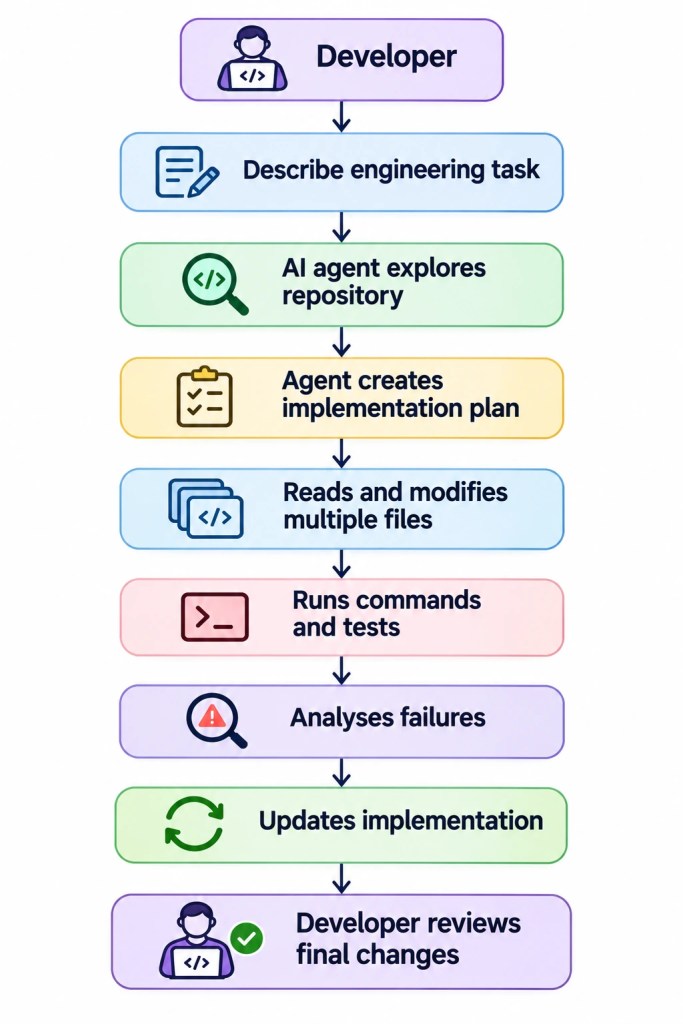
The developer is no longer manually coordinating every file operation. Instead, the developer becomes responsible for defining the requirements, setting boundaries, and reviewing the result.
This is why comparing AI coding assistants only by autocomplete quality is misleading.
The more important question is:
How effectively can the assistant convert an engineering requirement into a correct, testable, reviewable change?
Phase 2: The Mental Model — How an AI Coding Assistant Actually Works
Why can two assistants powered by capable language models behave so differently?
Because the model is only one part of the system.
Think of an AI coding assistant as a new software engineer joining your development team. That engineer needs access to the repository, documentation, terminal, testing environment, development rules, and relevant project history.
A brilliant engineer without access to the codebase cannot fix your production bug. Similarly, a powerful language model without the right context and tools cannot reliably complete a complicated engineering task.
The six components of an AI coding assistant
1. Language model — The reasoning engine
The language model interprets your request, reasons about possible solutions, generates code, and decides what information it needs next.
Different assistants may let you select models from providers such as OpenAI, Anthropic, Google, or their own model families.
The model influences reasoning quality, output quality, latency, and cost. However, selecting the strongest available model does not automatically produce the best engineering result.
2. Context engine — The engineer’s working memory
A model cannot necessarily load your entire repository into one request.
Instead, the assistant must identify relevant files, functions, imports, dependencies, documentation, and previous changes.
This resembles an engineer’s working memory: only the information relevant to the current problem should occupy the immediate workspace.
A large context window helps, but it does not guarantee that the correct information will be retrieved.
For a deeper explanation of repository retrieval, see How Cursor Reads 100,000 Files.
3. Tool layer — The engineer’s hands
A coding agent needs tools to interact with the development environment.
Typical tools include:
- File search and file reading.
- Code editing and patch application.
- Terminal and shell commands.
- Git operations.
- Browser automation.
- Documentation search.
- External integrations through MCP servers.
The availability of a tool does not mean every product uses it in the same way. Some tools operate locally, while others execute in isolated cloud environments.
4. Agent harness — The engineering coordinator
The agent harness manages the interaction between the language model and its tools.
It determines how tool calls are executed, how results return to the model, when another reasoning step is required, and how a task ends.
It also manages permissions, session state, context limits, and other execution policies.
This component is particularly important because two products can use similar models but implement different agent workflows.
5. Execution environment — The development workspace
The agent needs somewhere to execute its actions.
That environment might be:
- Your local machine.
- A cloud virtual machine.
- A container.
- A remote development environment.
- A GitHub Actions-based environment.
The environment determines which files, dependencies, credentials, and network resources are available.
6. Feedback system — The engineering quality gate
After changing code, an agent needs feedback.
This may include compiler errors, test failures, linting results, type errors, browser output, or developer feedback.
The agent can use this information to modify its implementation.
Without a reliable feedback loop, an assistant may confidently return code that has never been executed.
A simplified architecture

This diagram represents a general architecture, not the published internal architecture of every product.
Context window versus repository indexing
What happens when an AI coding assistant claims to understand a huge codebase?
You should distinguish two concepts.
Repository indexing helps the system locate relevant information. Depending on the implementation, this can involve lexical search, embeddings, metadata, syntax-aware retrieval, or other techniques.
Context windows determine how much information the model can process in a particular interaction.
Think of repository indexing as a searchable library and the context window as the desk where you can spread out documents.
A library can contain millions of pages, but you only place the documents relevant to your current task on the desk.
A larger desk is useful, but it does not make the librarian better at finding the right document.
This distinction explains why a smaller, well-retrieved context can outperform a huge context filled with irrelevant files.
Read more about Context Engineering vs Prompt Engineering and AI Agent Memory Systems Explained.
Phase 3: Internal Working Deep Dive — What Happens After You Submit a Coding Task?
How does an AI coding assistant move from a natural-language instruction to an actual code change?
Let’s follow the payment-processing example.
The exact implementation differs across Cursor, Copilot, Claude Code, Devin Desktop, Antigravity, and Codex. However, their agentic workflows can be understood through a common sequence.
Step 1: Interpret the task
You submit:
Investigate the payment concurrency issue. Find the root cause, implement a safe fix, and add regression tests without changing the existing API contract.
The system first interprets the objective.
A good agent should understand that the task has several constraints:
- Investigate before editing.
- Preserve the existing API contract.
- Address concurrency rather than hiding the error.
- Add regression tests.
- Verify the implementation.
This is why a clear task description matters.
An ambiguous instruction such as “fix the payments” leaves too much room for the agent to make assumptions.
Step 2: Collect repository context
The assistant explores the repository.
It may inspect:
- Project structure.
- Package configuration.
- Payment controllers.
- Service classes.
- Repository methods.
- Database migrations.
- Existing tests.
- Relevant documentation.
The retrieval strategy matters here.
Searching only for the word payment may miss a method called debitAccount() that actually performs the balance update.
A stronger retrieval strategy follows dependencies rather than relying entirely on keyword matching.
Some assistants also maintain project-level instructions and reusable knowledge. These help avoid repeating the same onboarding work for every task.
Step 3: Identify the implementation strategy
After inspecting the relevant code, the agent forms a plan.
For example:
1. Trace the payment request lifecycle.
2. Inspect balance update operations.
3. Identify concurrency weaknesses.
4. Select an appropriate transactional strategy.
5. Add a regression test.
6. Implement the change.
7. Run related and full tests.
8. Report the changes and remaining risks.
Planning is especially useful for tasks that involve several independent components.
However, a plan is not proof that the agent understands the system. You still need to evaluate whether the plan respects the architecture and business rules.
Step 4: Execute tool calls
The agent now interacts with its tools.
It might use a file-search tool to locate the relevant method, a file-reading tool to inspect its implementation, and a terminal tool to run existing tests.
It may then edit multiple files.
The exact tools available depend on the product and its configuration. For example, GitHub Copilot supports MCP integrations in agent mode, while Claude Code exposes configurable tool permissions through its CLI. GitHub Docs+1
Step 5: Run the implementation
Suppose the agent changes the database update logic.
It now needs to execute the tests.
A useful test suite should verify more than whether the endpoint returns HTTP 200.
It should test important properties:
- Two simultaneous debit requests cannot spend the same balance.
- A failed payment does not partially update the balance.
- A successful payment updates the ledger exactly once.
- The API response format remains unchanged.
This is where the development environment becomes important.
An agent that can edit files but cannot execute the relevant database tests may produce a plausible patch without validating the actual failure.
Step 6: Analyse errors and iterate
Suppose the first test fails.
The agent receives an error message indicating that the balance is updated twice.
It should examine the test failure, revisit the implementation, and modify its solution.
This is the agent loop:
Reason
  |
  v
Choose a tool
  |
  v
Execute the tool
  |
  v
Observe the output
  |
  v
Reason again
  |
  v
Continue or stop
The process can repeat several times.
However, repeated attempts do not guarantee a correct solution. An agent can also enter an unproductive loop, repeatedly changing code without addressing the underlying issue.
Step 7: Generate the final changes
When the agent believes the task is complete, it prepares its output.
Depending on the product, this might include:
- Modified source files.
- New regression tests.
- A Git diff.
- A summary of implementation decisions.
- Test results.
- A pull request.
The developer then inspects the changes.
Step 8: Human review and approval
This is not an optional final formality.
You should review whether the agent:
- Changed only the intended components.
- Preserved existing behaviour.
- Introduced security problems.
- Added meaningful tests.
- Followed coding standards.
- Made unnecessary architectural changes.
The assistant can accelerate the implementation process, but responsibility for accepting the change remains with the engineering team.
Agent execution sequence

The important engineering insight is that agent quality depends on the entire loop, not simply the quality of the initial generated code.
Phase 4: Engineering Implementation — How to Evaluate Coding Assistants Properly
How should you decide whether Cursor is better than Copilot or Claude Code for your actual work?
Do not rely entirely on demonstrations, social-media opinions, or isolated coding benchmarks.
You need a repeatable test using the same repository, task, constraints, and acceptance criteria.
A tool may generate code quickly but require extensive manual corrections. Another may take longer to complete the task but produce a cleaner patch with better tests.
The right comparison should measure the whole engineering outcome.
Build a small evaluation framework
Start by choosing a real task from your project.
For example:
“Add pagination to the transaction-history API. Preserve the existing response structure, validate page parameters, add unit tests, and avoid changing unrelated endpoints.”
Then create an isolated Git worktree for every assistant.
Each assistant should start from the same commit.
Your evaluation should measure:
| Metric | What it tells you |
|---|---|
| Acceptance tests | Whether the requested behaviour works |
| Regression tests | Whether existing functionality remains correct |
| Lint and type checks | Whether code follows technical constraints |
| Changed files | Whether the agent modified the expected scope |
| Lines changed | How much implementation work it introduced |
| Execution time | How long the task took to complete |
| Usage cost | How much AI usage the task consumed |
| Review effort | How much manual correction was necessary |
A particularly important metric is review effort.
A tool that generates 500 lines of unnecessary code may be less useful than one that generates 100 lines of focused, maintainable code.
A reusable Python evaluation script
The following script runs your project checks and records the results in JSON.
It uses Python’s standard library, so you do not need an additional AI SDK or API key.
Dependencies: Python 3.10 or later, Git, and the testing/linting tools already used by your project. For example, install pytest, ruff, and mypy when those tools are part of your Python project.
Create a file named evaluate.py.
from __future__ import annotations

import argparse
import json
import shlex
import subprocess
import sys
import time
from pathlib import Path
from typing import Any


def clip_output(value: str | bytes | None, limit: int = 12000) -> str:
    """Limit saved command output to keep reports manageable."""
    if value is None:
        return ""

    if isinstance(value, bytes):
        value = value.decode("utf-8", errors="replace")

    if len(value) <= limit:
        return value

    return value[:limit] + "\n... output truncated ..."


def git_output(args: list[str], cwd: Path) -> str:
    """Run a Git command and return its output."""
    result = subprocess.run(
        ["git", *args],
        cwd=cwd,
        text=True,
        capture_output=True,
        check=False,
    )

    if result.returncode != 0:
        raise RuntimeError(
            f"Git command failed: {' '.join(args)}\n"
            f"{result.stderr}"
        )

    return result.stdout


def run_check(command: str, cwd: Path, timeout: int) -> dict[str, Any]:
    """Execute one validation command without invoking a shell."""
    argv = shlex.split(command)

    if not argv:
        raise ValueError("An empty validation command was supplied.")

    start = time.perf_counter()

    try:
        result = subprocess.run(
            argv,
            cwd=cwd,
            text=True,
            capture_output=True,
            timeout=timeout,
            check=False,
        )

        return {
            "command": command,
            "exit_code": result.returncode,
            "success": result.returncode == 0,
            "elapsed_seconds": round(time.perf_counter() - start, 2),
            "stdout": clip_output(result.stdout),
            "stderr": clip_output(result.stderr),
        }

    except FileNotFoundError as exc:
        return {
            "command": command,
            "exit_code": 127,
            "success": False,
            "elapsed_seconds": round(time.perf_counter() - start, 2),
            "stdout": "",
            "stderr": str(exc),
        }

    except subprocess.TimeoutExpired as exc:
        return {
            "command": command,
            "exit_code": 124,
            "success": False,
            "elapsed_seconds": round(time.perf_counter() - start, 2),
            "stdout": clip_output(exc.stdout),
            "stderr": "Command timed out.",
        }


def main() -> int:
    parser = argparse.ArgumentParser(
        description="Evaluate an AI-generated code change."
    )

    parser.add_argument(
        "--base",
        default="origin/main",
        help="Git reference to compare against.",
    )

    parser.add_argument(
        "--check",
        action="append",
        required=True,
        help="Validation command. Repeat this option for more checks.",
    )

    parser.add_argument(
        "--timeout",
        type=int,
        default=1800,
        help="Maximum seconds allowed per validation command.",
    )

    parser.add_argument(
        "--out",
        default="evaluation-report.json",
        help="JSON report output path.",
    )

    args = parser.parse_args()

    if args.timeout <= 0:
        parser.error("--timeout must be greater than zero.")

    try:
        root = Path(
            git_output(
                ["rev-parse", "--show-toplevel"],
                Path.cwd(),
            ).strip()
        )

        diff_stat = git_output(
            ["diff", "--stat", args.base, "--"],
            root,
        )

        changed_files = git_output(
            ["diff", "--name-only", args.base, "--"],
            root,
        ).splitlines()

        working_tree = git_output(
            ["status", "--short"],
            root,
        ).splitlines()

    except (RuntimeError, OSError) as exc:
        print(f"Could not inspect repository: {exc}", file=sys.stderr)
        return 2

    checks = [
        run_check(command, root, args.timeout)
        for command in args.check
    ]

    report = {
        "repository": str(root),
        "base_reference": args.base,
        "changed_files": changed_files,
        "working_tree_status": working_tree,
        "diff_stat": diff_stat,
        "checks": checks,
        "all_checks_passed": all(
            check["success"] for check in checks
        ),
    }

    output_path = Path(args.out).resolve()
    output_path.parent.mkdir(parents=True, exist_ok=True)

    output_path.write_text(
        json.dumps(report, indent=2),
        encoding="utf-8",
    )

    print(f"Report saved to: {output_path}")
    print(f"Changed files: {len(changed_files)}")

    for check in checks:
        status = "PASS" if check["success"] else "FAIL"
        print(
            f"{status}: {check['command']} "
            f"({check['elapsed_seconds']} seconds)"
        )

    return 0 if report["all_checks_passed"] else 1


if __name__ == "__main__":
    raise SystemExit(main())
What problem it solves: It provides a consistent validation process after an AI assistant modifies your project. You can compare the results of different agents without relying only on their descriptions of completed work.
Key parts: The script records changed files, Git status, validation commands, execution time, exit codes, and command output. You can repeat --check to execute multiple checks.
Production notes: Run each assistant in a separate Git worktree created from the same commit. Avoid running multiple agents against the same working directory. The script does not evaluate architecture or security automatically, and its report does not establish correctness by itself. Add project-specific integration, security, and acceptance tests.
Run the evaluation
For example, execute this from the repository root:
python evaluate.py --base origin/main --check "pytest -q" --check "ruff check ." --check "mypy src" --out report.jsonYou can adapt the checks to a Java, JavaScript, Go, or other development environment by replacing the commands.
Use one prompt for every assistant
The most important part of this experiment is consistency.
Give every assistant the same task description.
A useful prompt template is:
Investigate the requested change before editing. Identify the relevant files and dependencies. Preserve existing public APIs and project conventions. Explain your implementation plan. Implement the smallest safe change. Add regression tests covering normal behaviour and relevant edge cases. Run the available checks and report every test that passed or failed. Do not modify unrelated components.
Also define a stopping rule. For example, stop after a fixed task deadline or usage budget, and record whether the agent completed the acceptance criteria.
What should your evaluation prioritise?
For production engineering, use this priority order:
- Functional correctness.
- Regression safety.
- Security and permission boundaries.
- Maintainability.
- Review effort.
- Execution time and usage cost.
Do not allow a faster assistant to win simply because it produced a patch first.
The goal is to identify the assistant that helps you ship reliable software with the least total engineering effort.
Phase 5: Real-World Systems and Scale — Six Products, Six Different Workflows
What actually separates Cursor, Copilot, Claude Code, Devin Desktop, Antigravity, and Codex?
Their product designs reveal different approaches to the same engineering problem.
1. Cursor — AI-native editor with increasingly autonomous agents
Cursor started as an editor built around AI-assisted development. Its current workflow includes an Agent that can search repositories, edit files, run shell commands, use browser tools, and work with other connected tools. Cursor Docs+1
The important change in 2026 is the introduction of Cursor Projects.
Projects are designed for work that extends beyond one conversation. A coordinator agent plans and delegates tasks to other agents, while shared project context helps preserve working knowledge over time. Projects run on Cloud Agents and can coordinate local and remote execution. Cursor Docs+1
Consider a feature that requires changes across a frontend, backend, and shared library.
You can describe the overall objective, then use the project coordinator to distribute independent work. You still review the resulting changes, but you do not need to manually coordinate every agent interaction.
Where Cursor stands out: Developers who want an AI-first editor, multi-file editing, codebase exploration, and increasingly autonomous project workflows.
Where it struggles: Cloud-based workflows require proper environment configuration, and cloud execution does not automatically include your uncommitted local changes. You must also understand the current usage model before selecting third-party models. Cursor Docs+1
One more important update: Cursor announced its acquisition by SpaceX in August 2026. Its newer subscription offering bundles Cursor with Grok and X, while some older Cursor subscriptions continue under legacy arrangements. Cursor+1
2. GitHub Copilot — The practical choice for existing engineering teams
GitHub Copilot has a major advantage: it works across development environments rather than requiring you to move your entire workflow into a new editor.
It supports Visual Studio Code, Visual Studio, JetBrains IDEs, Xcode, Eclipse, and other supported environments.
Copilot Agent mode can receive a high-level task, determine which files need modification, execute commands, and iterate on the implementation. You can inspect its changes and control whether proposed terminal commands run. GitHub Docs+1
Its cloud agent is particularly relevant for teams already using GitHub.
You can assign work through an issue or describe a task to the agent. It can investigate the repository, implement changes, and produce a pull request for review. GitHub Docs+1
For example, your team might create a GitHub issue:
“Add an API rate limiter to the authentication service. Include unit tests and update the developer documentation.”
Instead of starting the task locally, you can delegate it through the GitHub workflow and inspect the resulting pull request.
Another important capability is model selection. Copilot provides access to different models, including third-party coding models, depending on your plan and availability.
Its usage system is worth understanding. GitHub AI Credits depend on the model and token consumption, so a long agent task may consume significantly more credits than a short autocomplete interaction. GitHub Docs+1
Where Copilot stands out: Existing GitHub teams, developers who prefer their current IDE, and organisations that want agent workflows connected to issues and pull requests.
Where it struggles: Its credit-based usage can make heavy agent workflows expensive to predict, and the overall experience depends on the configured editor, plan, and organisation policies.
3. Claude Code — Terminal-first agentic development
Claude Code approaches software development differently.
Rather than making the editor the central experience, it treats the terminal as the main interface.
You work directly inside a repository, start a Claude Code session, and describe the task. The agent can inspect project files, make modifications, run commands, and continue a conversation across sessions.
Its CLI supports interactive sessions, non-interactive execution, piped input, and session resumption. Claude Code Docs+1
For example, the following command starts an interactive session:
claudeYou can also use it to investigate a project without opening an interactive session:
claude -p "Explain the authentication flow in this repository"Another important feature is permission control.
Claude Code supports configurable permission modes and allows you to control which tools can run without additional approval. For example, the CLI supports a planning mode and explicit allowed or disallowed tool configurations. Claude Code Docs+1
That makes it useful when you want a terminal-based development workflow with explicit control over what the agent can do.
Where Claude Code stands out: Multi-file refactoring, repository investigation, debugging, terminal-based development, and developers who are comfortable working with CLI tools.
Where it struggles: You need to become comfortable with terminal workflows, session management, and permission configuration. Unrestricted command execution is not a safe default for untrusted repositories.
For a deeper look at repository exploration, read How Claude Searches Your Codebase.
4. Windsurf, now Devin Desktop — From AI editor to agent command centre
Devin Desktop is the current name of the product many developers still know as Windsurf.
Cognition announced its agreement to acquire Windsurf in July 2025. The product was subsequently renamed Devin Desktop in June 2026, with the existing IDE foundation retained. Cognition+1
The current product is more than an autocomplete-focused editor.
Devin Desktop provides a workspace for managing coding agents and their sessions. It supports local development workflows alongside cloud agents, while its Agent Command Center helps developers manage and review multiple pieces of delegated work.
Its documentation identifies Devin Local as the primary local agent, with shared capabilities and settings for repository context, rules, workflows, and MCP integrations. Devin Docs+1
The product is also built around model flexibility.
Its official offering describes access to models from several major providers, including OpenAI, Anthropic, and Google. This means your development workflow does not have to be tied to one model family.
Where it stands out: Developers who want an IDE combined with local and cloud agent management, and teams interested in coordinating multiple development tasks.
Where it struggles: The product and agent experience have undergone substantial changes, so older Windsurf tutorials may describe workflows that no longer match the current interface.
When evaluating it, use current Devin Desktop documentation instead of relying on old Cascade-focused comparisons.
5. Google Gemini — Antigravity is now the important individual coding workflow
Google Antigravity represents Google’s move towards a unified agent-first development environment.
This matters because many older tutorials still recommend Gemini CLI or the individual Gemini Code Assist extension.
Google announced in May 2026 that it was consolidating its individual developer workflow around Antigravity and Antigravity CLI. On June 18, 2026, Gemini CLI and the relevant individual IDE extensions stopped serving requests for the individual and Google AI Pro/Ultra access paths. Existing enterprise arrangements followed a separate transition. Google Developers Blog+1
Antigravity is designed around agent-based development.
Its feature set includes a desktop environment, IDE extensions, terminal access, CLI workflows, reusable agent skills, rules, and parallel subagents.
Antigravity CLI provides a terminal-first way to interact with Antigravity agents and delegate work across multiple agent sessions. Google Antigravity Docs+2
For example, you could separate a larger task into:
- One agent investigating the existing authentication implementation.
- Another agent analysing the test coverage.
- A third agent preparing a migration plan.
You can then inspect the results and coordinate the implementation.
Google also uses plan-based usage limits. Individual access has a free baseline with weekly limits, while Google AI Pro and Ultra increase usage allowances. The documentation explains that complex tasks can consume more quota than simple requests. Pricing+1
Where Antigravity stands out: Developers interested in Google’s models, CLI-based agents, multi-agent workflows, and an integrated agent-first development environment.
Where it struggles: You must understand the distinction between individual Antigravity access and existing Gemini Code Assist enterprise contracts. Google also states that rate limits and model availability can change.
For enterprise readers, there is another relevant date: Google stopped accepting new Gemini Code Assist Standard and Enterprise subscriptions from October 9, 2026. Existing contracts have separate renewal and support timelines. Google Cloud Documentation+1
6. ChatGPT — Codex is the coding agent to evaluate
When developers say ChatGPT is their coding assistant, they often mean one of two things:
- Using ChatGPT to explain, generate, and review code.
- Using OpenAI’s dedicated coding agent, Codex.
These are related experiences, but they should not be treated as identical.
OpenAI Codex is designed to help write, review, debug, and modify code. It can be used through supported IDE experiences, the CLI, web and mobile interfaces, and CI/CD workflows through its SDK. OpenAI API+1
Codex is particularly interesting when you want to delegate a task rather than continuously interact with every code edit.
For example, you might ask it to:
- Investigate a failing test suite.
- Refactor a legacy module.
- Review a pull request.
- Add support for a new API endpoint.
- Generate a technical implementation plan.
At the developer-platform level, OpenAI also documents an Agents API built around a managed Codex harness. The application can provide execution environments in which agents run commands, edit files, and connect to tools. OpenAI API+1
Codex is included in eligible ChatGPT plans, with different usage limits. However, Codex Cloud is not included with Free and Go accounts, so access to the more autonomous workflows depends on your subscription and availability. ChatGPT+1
Where Codex stands out: Developers who want to delegate coding tasks, work across different interfaces, use a managed coding-agent workflow, or integrate agent execution into a larger development system.
Where it struggles: Usage limits vary across plans, and you should not assume that a general ChatGPT conversation has the same repository access and execution capabilities as Codex.
Phase 6: Advantages, Limitations, and Trade-offs
Which AI coding assistant is actually best?
The answer depends on the work you want it to perform.
A developer who spends most of the day in VS Code may prefer Copilot. Someone doing extensive repository refactoring may prefer Claude Code. A team coordinating multiple independent coding tasks may find Cursor Projects or Devin Desktop more relevant.
The most useful comparison separates workflow design from model quality.
Overall comparison
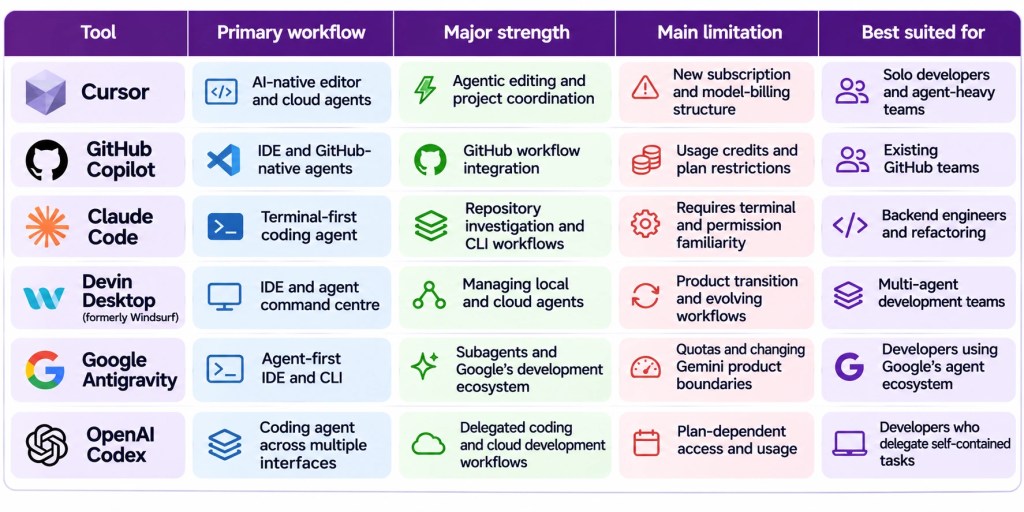
These are workflow recommendations rather than the results of a controlled benchmark.
Pricing comparison: What should you expect to pay?
Pricing is one of the most confusing parts of AI coding tools in 2026.
A monthly subscription does not necessarily mean unlimited use of every agent or model. Some products have usage credits, weekly limits, model-specific consumption, or additional usage charges.
Here is the official pricing snapshot from November 11, 2026.
| Product | Entry-level access | Paid options | Important pricing detail |
|---|---|---|---|
| Cursor | Free | Plus $8, Premium $30, Super $100, Ultra $200/month | New plans use a shared weekly usage pool; third-party models are billed separately |
| GitHub Copilot | Free | Pro $10, Pro+ $39, Max $100/month | Monthly GitHub AI Credits |
| Claude Code | Claude Free does not include the same paid Claude Code access | Pro $20/month, Max $100, Ultra $200/month | Annual Pro billing works out to $17/month |
| Devin Desktop | Free | Pro $20, Max $200/month | Additional usage available at API pricing |
| Google Antigravity | Free | Google AI Pro and Ultra | Model access, rate limits, and AI credit options vary by subscription |
| OpenAI Codex | Limited access through ChatGPT Free | Included across eligible Go, Plus, Pro, Business, and Enterprise plans | Usage limits vary; Codex Cloud is not included with Free or Go |
Sources: official Cursor, GitHub, Anthropic, Devin, Google Antigravity, and OpenAI pricing documentation. Cursor Docs+6
A few pricing details deserve attention.
Cursor: The newer Plus plan is not equivalent to the previous Pro plan. Plus includes Cursor’s first-party model offering, while Premium and higher plans provide access to third-party models at their API prices. Some legacy subscribers retain their previous plan arrangements. Cursor Docs+1
GitHub Copilot: Monthly AI Credits are tied to model and token consumption. A long-running agent task can cost more than simple code completion. GitHub Docs+1
Claude Code: The Pro plan is available at $20 month-to-month or $200 billed annually. Max and Ultra provide higher usage capacity, but limits still apply. Claude by Anthropic+1
Devin Desktop: Its current Pro subscription is $20 per month, while the higher individual tier is $200. The team plan has a base cost and additional charges for full developer seats. Devin
Antigravity: A free individual tier is available, and paid Google AI subscriptions provide more generous usage. You should check the live plan documentation before making a purchasing decision because rate limits can change. Pricing+1
Codex: You are purchasing a ChatGPT subscription rather than a separate standalone Codex subscription in the standard individual offering. The available coding capacity depends on the plan. ChatGPT+1
Prices above are in USD and may exclude local taxes. For Indian users, check the final INR price displayed at checkout.
Advantages of AI coding assistants
Modern coding assistants provide several practical engineering benefits.
1. Faster repository understanding
You can ask an agent to trace a request lifecycle, locate business logic, identify dependencies, or explain an unfamiliar module.
2. Reduced repetitive implementation work
Tasks such as generating tests, updating documentation, changing repetitive API patterns, and performing mechanical refactoring can be delegated.
3. Faster debugging cycles
Instead of manually copying errors into a separate chatbot, an agent with repository and terminal access can investigate the code and test possible fixes.
4. Parallel work
Some platforms allow multiple agents to investigate independent parts of a task simultaneously. Cursor Projects and Antigravity are examples of systems designed around this kind of workflow.
5. Better tool integration
MCP and other integration mechanisms allow agents to interact with external services and development tools. This expands their usefulness beyond the code editor.
Read the MCP Model Context Protocol Explained article to understand how an agent can connect to external tools.
Limitations you should not ignore
AI coding assistants still have significant weaknesses.
1. Incorrect assumptions
An agent may misunderstand business logic and implement something that passes its tests but violates a requirement that was never represented in those tests.
2. Weak test coverage
A passing test suite does not prove that all relevant production scenarios have been tested.
3. Context retrieval failures
If an agent misses an important dependency, it can make changes that appear correct in isolation but fail at the system level.
4. Security risks
An agent with terminal and network access can do more than generate code. It can also execute unintended commands or interact with external systems.
Repository files, documentation, issue descriptions, and terminal output should not automatically be treated as trusted instructions.
GitHub explicitly documents the use of a firewall for Copilot’s cloud agent to limit internet access and reduce data-exfiltration risks. GitHub Docs
You should apply the same engineering mindset to all agents: use least-privilege access, isolate environments, protect secrets, and review proposed actions.
For a deeper explanation, see Prompt Injection Explained.
5. Unpredictable costs
Agent workflows can involve repeated model calls, large context retrieval, tool use, and lengthy execution. A subscription that looks inexpensive may not be the cheapest option for heavy daily use.
6. Maintenance overhead
Adding an AI assistant to a development team introduces new configuration, permissions, model selection, usage tracking, and review requirements.
What most tutorials get wrong
Most AI coding assistant comparisons focus on three things:
- Which model generates the best code?
- Which tool has the largest context window?
- Which interface looks the most impressive?
These are not enough to determine engineering productivity.
Consider two assistants that receive the same requirement.
Assistant A generates a working implementation in three minutes, but modifies unrelated files, misses edge cases, and requires an hour of review.
Assistant B takes eight minutes, changes only the necessary components, adds regression tests, and produces a clean patch that needs ten minutes of review.
Assistant B has delivered the more useful engineering outcome.
The difference is not simply model intelligence. It is the quality of context retrieval, tool orchestration, feedback, permissions, and reviewability.
The real unit of comparison is the accepted engineering change, not the generated code snippet.
This is also why agent memory matters. A system that repeatedly forgets architecture decisions, testing conventions, or previous investigation results may struggle with long-running development work. Read Why AI Agents Fail: Memory, Context and Tools.
Phase 7: Relevance in the AI Era and Career Impact
Will AI coding assistants replace software engineers?
The more practical question is how the role of a software engineer changes when code-writing, repository exploration, and routine debugging can increasingly be delegated to agents.
The answer is that software engineering becomes more focused on system-level decisions and verification.
An agent may implement an API endpoint, but someone must still decide:
- Whether the API design is appropriate.
- Whether the database model is correct.
- Whether concurrency is handled safely.
- Whether authentication and authorisation are implemented properly.
- Whether the system scales.
- Whether the test coverage is sufficient.
- Whether the change is safe to deploy.
These responsibilities require engineering judgement.
Skills you should develop
1. System design and architecture
Understand how services communicate, how data flows through an application, and how components behave under failure.
AI agents can help implement an architecture, but you should be able to determine whether the architecture itself is appropriate.
2. Data structures and algorithms
Do not abandon DSA because coding assistants can generate implementations.
You still need to recognise inefficient algorithms, evaluate complexity, understand concurrency, and reason about performance.
A developer who cannot independently evaluate a generated algorithm will have difficulty identifying expensive or incorrect solutions.
3. Testing and debugging
Test design is becoming particularly valuable.
You should understand unit testing, integration testing, contract testing, regression testing, and performance testing.
Your ability to identify missing test cases determines how effectively you can supervise an AI coding agent.
4. Context engineering
Learn to provide structured project information.
Useful resources include:
AGENTS.mdor equivalent project instructions.- Architecture documentation.
- Coding standards.
- Testing conventions.
- Database schemas.
- API specifications.
- Reusable agent skills.
Context engineering is more than writing longer prompts. It is about ensuring that the agent receives reliable, relevant information before it acts.
5. Agent tools and integrations
Learn how tools such as MCP servers, command-line interfaces, Git integrations, and development APIs extend an agent’s capabilities.
This connects traditional software engineering with AI systems engineering.
6. AI security and evaluation
Understand permission boundaries, sandboxing, secret management, prompt injection, and automated evaluations.
These are important skills when agents are allowed to interact with real repositories and external services.
For more guidance, explore the AI Career Roadmap: Beginner to AI Engineer.
Which career roles benefit from these tools?
| Role | Relevant skills |
|---|---|
| Software Engineer | AI-assisted development, code review, testing, architecture |
| AI Engineer | LLM integration, agent orchestration, tool calling, RAG |
| AI Platform Engineer | Agent runtimes, model management, observability, security |
| Developer Productivity Engineer | IDE integrations, coding agents, CI/CD automation |
| Backend Engineer | API development, databases, distributed systems, debugging |
| SDET / QA Automation Engineer | Test generation, regression testing, agent evaluation, automation |
| LLMOps Engineer | Deployment, monitoring, cost optimisation, evaluation pipelines |
Interview questions you should prepare
1. What is the difference between an AI coding assistant and an AI coding agent?
A coding assistant may primarily suggest or explain code, while a coding agent can use tools to perform multi-step tasks. Modern products increasingly combine both approaches.
2. How does an agent understand a large codebase?
Explain repository indexing, file search, dependency tracing, context selection, retrieval, and context-window limitations.
3. Why can an agent produce incorrect code even when it uses a powerful language model?
Discuss incomplete context, ambiguous requirements, incorrect assumptions, weak tests, and tool execution failures.
4. How would you evaluate two AI coding assistants for a production engineering team?
Discuss controlled tasks, isolated environments, acceptance tests, regression testing, code review effort, security, latency, and cost.
5. How would you securely allow an AI agent to modify a production repository?
Discuss least privilege, isolated execution, permission approval, secret protection, network restrictions, auditability, and human review.
These questions connect directly to modern AI engineering and software development interviews.
Key Takeaways
- There is no universally best AI coding assistant. The right choice depends on your IDE, repository, development process, and engineering requirements.
- Cursor is attractive for AI-native editing, Cloud Agents, and long-running project coordination.
- GitHub Copilot is a practical option for developers and teams already using GitHub and established IDEs.
- Claude Code is particularly relevant for terminal-first development, repository exploration, and complex refactoring.
- Windsurf is now Devin Desktop, so current comparisons should evaluate its newer agent command-centre experience rather than rely on older product descriptions.
- Google Antigravity is the important current individual developer workflow for Google’s agent-first coding ecosystem.
- OpenAI Codex provides a dedicated coding-agent workflow across supported development interfaces.
- Your most important skill is not simply writing prompts. It is defining engineering requirements, supplying context, testing agent-generated changes, and reviewing them safely.
FAQ: Best AI Coding Assistants in 2026
1. Which is the best AI coding assistant in 2026?
There is no single winner for every developer. Cursor is worth considering for AI-native IDE workflows, Copilot for GitHub-centric teams, Claude Code for terminal-based development, and Codex or Antigravity for agent-oriented development. Your repository and actual engineering tasks should determine the winner.
2. Is Cursor better than GitHub Copilot?
Cursor offers an AI-first editor experience with Cloud Agents and project-level coordination. GitHub Copilot works across several established IDEs and integrates directly with GitHub issues and pull requests. Cursor may suit developers who want to change their workflow around AI, while Copilot is particularly convenient for teams that want to retain their existing development environment.
3. Is Claude Code better than Cursor for large projects?
Both can work with large repositories, but their workflows differ. Claude Code is terminal-first, while Cursor combines code editing, agent interaction, and cloud development features in its editor ecosystem. Repository retrieval, task complexity, available tools, and testing environment matter more than project size alone.
4. Is Windsurf still available in 2026?
Windsurf’s editor has been renamed Devin Desktop following Cognition’s acquisition. The current product retains the IDE foundation and provides a workspace for managing local and cloud coding agents. Older Windsurf tutorials may describe an interface or agent workflow that has since changed.
5. Is Google Gemini Code Assist still the right tool to learn?
For individual developers, Google Antigravity and Antigravity CLI are now the more relevant products to investigate. Google announced the transition from individual Gemini CLI and IDE-extension access in June 2026. Existing Gemini Code Assist enterprise subscribers have separate transition arrangements.
6. Will AI coding assistants replace software developers?
These tools automate parts of software development, but they do not remove the need for architecture, debugging, security, testing, and production decision-making. Developers who can effectively supervise agents and validate their output will be better prepared for increasingly agentic development workflows.


