Everyone Calls Everything an Agent Now
Open any job board, any startup pitch deck, any conference talk in 2026, and the word “agent” appears constantly — almost always without precision. A chatbot with a system prompt that says “you are an autonomous agent” gets called an agent. A single function call wrapped around an LLM is called an agent. A multi-step workflow with five hardcoded steps is called an agent. The word has been stretched so far that it risks meaning nothing at all.
Here’s the distinction that actually matters, and it’s simpler than the hype around it suggests: a chatbot responds. An agent decides, acts, observes its own actions, and decides again — in a loop, carrying state forward, until a goal is reached or it determines it genuinely needs help. That loop is not a clever prompt. It’s an architecture, and like any architecture, it’s made of specific, learnable engineering decisions: how does the model decide whether to act or just answer? How do you hand it the ability to act in the first place? How do you stop it from looping forever when something goes wrong? How does it remember what it already tried three steps ago?
Most engineers learn agents backwards. They start with a framework — LangGraph, CrewAI, AutoGen — and build something that works without ever understanding what the framework is actually doing underneath its abstractions. This works fine until something breaks, and in agentic systems, something always eventually breaks: a tool times out, the model hallucinates an argument, the loop runs forever, the agent loses track of its own goal. At that point, an engineer who only knows the framework’s API surface is stuck. An engineer who understands the mechanics underneath can read the failure, locate the actual problem, and fix it.
This article builds an agent the second way: from the ground up, in plain Python, with every engineering decision named and explained as we make it. By the end, you won’t just be able to describe what an agent is in an interview — you’ll have built one, broken it on purpose, and fixed it, which is the only way this knowledge actually sticks.
Phase 1: The Problem — Why a Single LLM Call Was Never Going to Be Enough
The Single-Shot Ceiling
A standard LLM API call is fundamentally a one-shot transformation: you send a prompt, the model generates a response, and the interaction ends. This works beautifully for an enormous range of tasks — summarization, translation, classification, creative writing, and question answering over information already present in the prompt. The model reasons over what it’s given and produces an answer in one pass.
But a large and important category of real tasks cannot be solved in one pass, no matter how good the underlying model is, because the task requires information the model doesn’t have yet and won’t have until it takes an action to retrieve it. “What’s the weather in Tokyo right now?” cannot be answered from the model’s training data — the model needs to call a weather API and read the result before it can answer. “Fix the failing test in this codebase” cannot be answered in one shot — the model needs to read the test, read the relevant source files, possibly run the test to see the actual failure output, make a change, and verify the fix worked. These tasks are not “harder questions.” They’re a structurally different kind of problem: ones where the answer depends on information that only exists after an action is taken.
Why Bolting On a Single Tool Call Doesn’t Solve It
The first fix engineers reached for, once function calling became available in LLM APIs around mid-2023, was straightforward: let the model request a tool call, execute it, hand the result back, and let the model produce a final answer. This is a genuine improvement — and it’s still not an agent, for a specific reason worth dwelling on. A single tool call assumes the task needs exactly one piece of external information, and that information request can’t fail in a way that requires a different strategy.
Real tasks rarely cooperate with that assumption. The weather API times out — now what? The first search query returns nothing relevant — does the model give up, or try a different query? The codebase fix didn’t actually pass the test — does the model report failure, or read the new error and try again? A system that can only call one tool once, then must produce a final answer regardless of what it learned, has no way to adapt to what it discovers along the way. It can react to the world exactly once. Real problems usually require reacting to the world repeatedly, adjusting strategy based on each new piece of information, until either the goal is achieved or the system has good reason to stop and ask for help.
The ReAct Insight: Reasoning and Acting as a Repeating Cycle
The conceptual breakthrough that made modern agents possible came from a 2022 research paper out of Princeton and Google, titled “ReAct: Synergizing Reasoning and Acting in Language Models.” Its core idea, in retrospect, looks almost too simple to have been a breakthrough: instead of separating “thinking” and “acting” into a single pass, interleave them explicitly, in a loop. Let the model reason about what it knows and what it needs (“Thought: I need to check the current weather before I can answer”), take an action based on that reasoning (“Action: call get_weather(‘Tokyo’)”), observe the result (“Observation: 18°C, light rain”), and reason again from that updated state (“Thought: I now have what I need to answer”). Repeat until the model reasons its way to “I have enough information to give a final answer,” and stop.
This loop — think, act, observe, think again — is the structural seed of every agent framework that exists today, including the ones with far more sophisticated state management, tool ecosystems, and human oversight layered on top. Strip away the production engineering and every agent, from a simple weather-checking bot to a multi-agent software engineering system, is running some version of this exact cycle.
Why This Took Until 2023-2024 to Become Practical
The ReAct paper existed in 2022, but agents didn’t become a practical engineering discipline until roughly a year later, for reasons worth understanding because they explain why building a reliable agent is still genuinely hard work today, not a solved problem.
First, models needed to get reliably good at the specific skill of deciding when to act versus when to just answer, and at producing correctly formatted tool calls with the right arguments — early models would frequently hallucinate plausible-looking but wrong function signatures, or call a tool when simply answering from existing knowledge would have been faster and more reliable. Native function-calling support, where the model is specifically trained to emit structured tool invocations rather than trying to parse free-form text into a tool call, was the engineering fix that made tool selection reliable enough for production use.
Second, the industry needed to develop patterns for the failure modes this loop introduces that a single-shot LLM call simply doesn’t have: what happens when a tool call fails? What happens when the model gets stuck reasoning in a circle, repeating the same failed action? How do you cap a loop that might otherwise run indefinitely, burning API costs with no end in sight? None of these are model capability problems — they’re systems engineering problems, and they’re the actual substance of what separates a fragile agent demo from a production-grade one.
Phase 2: Building the Mental Model
The Detective, Not the Oracle
Here’s the analogy that makes the agent loop intuitive. An oracle answers a question instantly, from what it already knows, in one breath. A detective works a case differently: they form a hypothesis, take an action to test it (examine evidence, interview a witness), observe what that action reveals, update their understanding based on what they learned, and decide what to investigate next — repeating this cycle until they’ve solved the case or concluded they need to bring in someone with different expertise.
A single LLM call is an oracle. An agent is a detective. The shift from one to the other isn’t about the detective being smarter than the oracle — it’s that the detective’s process is structured to acquire information it doesn’t yet have and adjust its approach based on what it finds, which is exactly the capability a one-shot model call lacks, and a looped, tool-using model has.
The Four Things Every Agent Needs
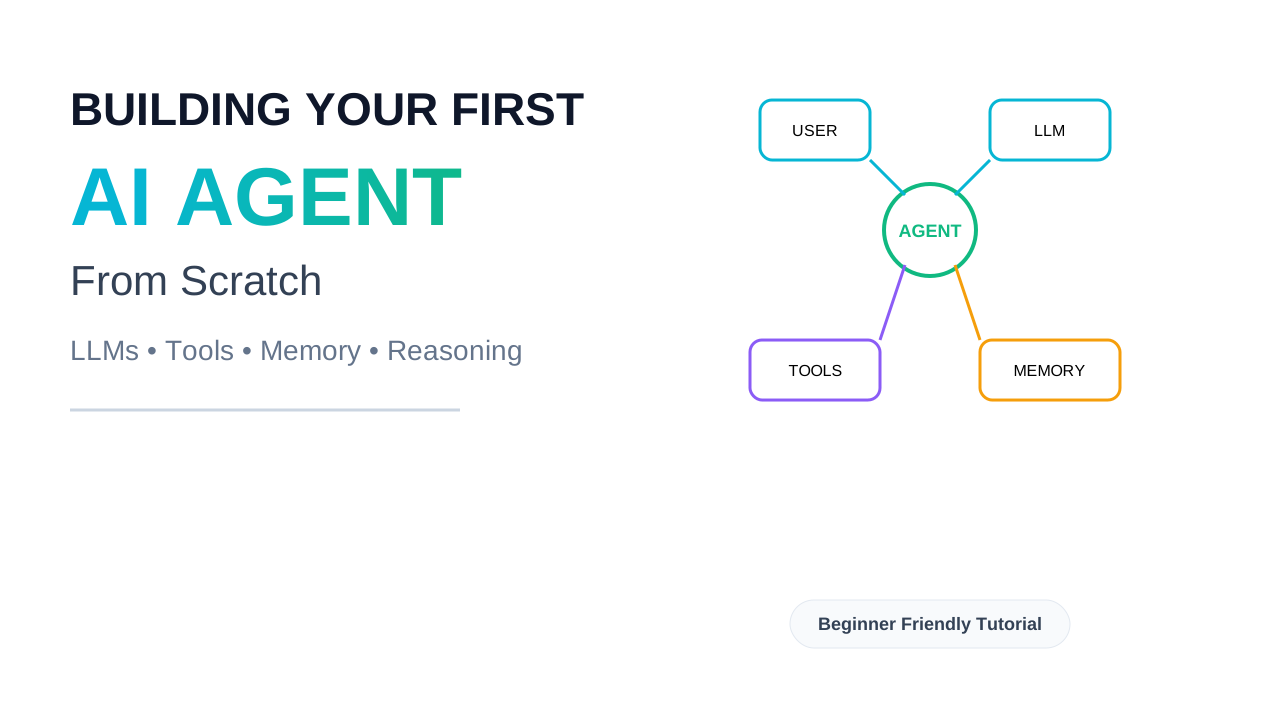
Strip any agent — simple or sophisticated — down to its essential components, and you find exactly four things, each solving a distinct problem.
A reasoning engine is the LLM itself, prompted to think step by step about what it knows, what it needs, and what to do next. This is the “brain” that decides whether to act or answer, and which action to take if it decides to act.
Tools are the agent’s hands — functions it can invoke to affect or observe the world beyond its own context window: searching the web, querying a database, running code, sending an email, reading a file. Without tools, an agent is just a chatbot with extra reasoning steps; tools are what let it actually do something.
State is the accumulated record of everything that’s happened so far in the current task: what was reasoned, what actions were taken, what was observed. State is what lets the agent’s second loop iteration build on its first, rather than starting from zero each time — without it, the agent would re-derive the same reasoning and possibly repeat the same failed action forever.
A stopping condition determines when the loop ends — either because the agent has reasoned its way to “I have enough information to answer” or because some safety boundary (a maximum number of iterations, a timeout, an explicit failure condition) has been hit. Without an explicit stopping condition, an agent loop is one bad reasoning step away from running forever, burning API calls with no resolution.
Every agent framework — and every agent you build by hand — is some specific implementation of these four ingredients. The differences between a toy agent and a production one come entirely from how carefully each of these four pieces is engineered, not from some additional fifth ingredient that frameworks have and hand-built agents lack.
The Loop, Visualized
   ┌─────────────────────────────────────────────┐
   │                                               │
   │   ┌──────────┐      ┌──────────┐             │
   └──▶│  REASON  │─────▶│   ACT    │             │
       │ (think)  │      │(use tool)│             │
       └──────────┘      └──────────┘             │
            ▲                  │                   │
            │                  ▼                   │
            │            ┌──────────┐               │
            └────────────│ OBSERVE  │───────────────┘
                          │ (result) │
                          └──────────┘

   Loop continues until:
   → Model reasons "I have enough to answer" → EXIT with final answer
   → Max iterations reached → EXIT with failure/escalation
   → Unrecoverable tool error → EXIT with failure/escalation
This diagram is, almost without exaggeration, the entire architecture of an AI agent. Everything else in this article is detail on how to implement each box correctly and handle what happens when a box doesn’t behave the way you expect.
Why State Has to Be Explicit, Not Implicit
A subtlety worth flagging now, because it trips up almost everyone building their first agent: the model itself does not remember anything between API calls. Each call to the LLM is stateless — the model has no memory of the previous loop iteration unless you explicitly include that history in the prompt you send this time. This means the agent’s “memory” of what it already tried isn’t a property of the model at all; it’s a property of your code, specifically the conversation history (or equivalent structured record) that you accumulate and resend on every loop iteration. Get this wrong — forget to include the previous tool result, or truncate the history incorrectly — and the agent will appear to “forget” what it just did and repeat the same action, which is one of the most common and confusing bugs in a first agent build.
Phase 3: Internal Working Deep Dive — What Actually Happens Inside the Loop
This is the heart of the article. We’re going to trace, in complete mechanical detail, exactly what happens from the moment a task is handed to an agent to the moment it produces a final answer — the same level of detail you’d need to actually debug one of these systems in production.
Step 1: Tool Definition — Teaching the Model What It Can Do
Before any reasoning happens, the model needs to know what actions are available to it. This is done by describing each tool in a structured schema — typically JSON Schema — that specifies the tool’s name, a natural-language description of what it does and when to use it, and the parameters it expects with their types.
tools = [
    {
        "name": "search_web",
        "description": (
            "Search the web for current information. Use this when the "
            "question requires up-to-date facts, current events, or "
            "information not likely to be in your training data."
        ),
        "input_schema": {
            "type": "object",
            "properties": {
                "query": {"type": "string", "description": "The search query"}
            },
            "required": ["query"],
        },
    },
    {
        "name": "calculate",
        "description": "Evaluate a mathematical expression and return the numeric result.",
        "input_schema": {
            "type": "object",
            "properties": {
                "expression": {"type": "string", "description": "A math expression, e.g. '47 * 12 + 8'"}
            },
            "required": ["expression"],
        },
    },
]
It’s worth dwelling on a detail that’s easy to skip past: the description field is not documentation for humans. It’s the only signal the model has for deciding when a tool is relevant, because the model never sees your source code — it only sees this schema. A vague description (“searches stuff”) produces a model that either never calls the tool when it should, or calls it indiscriminately when it shouldn’t. Writing a precise, example-grounded description is real engineering work, not an afterthought, because it directly determines whether the model’s tool-selection reasoning is accurate.
Step 2: The First Reasoning Pass
The agent’s loop begins by sending the user’s task, the system prompt establishing the agent’s role and behavior, and the tool definitions to the model, then inspecting what comes back. The model’s response will be one of two things: a final text answer (if it reasoned that it already has enough information), or a request to call one or more tools (if it reasoned that it needs more information first).
response = client.messages.create(
    model="claude-sonnet-4-6",
    max_tokens=1024,
    system=AGENT_SYSTEM_PROMPT,
    tools=tools,
    messages=conversation_history,
)
This is the “Reason” box from the diagram in Phase 2, made concrete: the model is reading everything it has so far (the task, any prior tool results already in conversation_history) and deciding what to do next. Crucially, this single API call is where all of the model’s “intelligence” about the task lives — the loop around it is comparatively dumb plumbing. The plumbing’s job is just to execute whatever the model decides and feed the result back faithfully.
Step 3: Detecting and Executing a Tool Call
If the model’s response contains a tool-use request rather than (or in addition to) a final text answer, the agent’s code needs to recognize this, extract the tool name and arguments the model provided, and actually execute the corresponding function.
def execute_tool(tool_name: str, tool_input: dict) -> str:
    """
    Dispatches a model-requested tool call to its real implementation.
    Returns a string result that will be shown back to the model.
    """
    if tool_name == "search_web":
        try:
            results = web_search_api(tool_input["query"])
            return format_search_results(results)
        except TimeoutError:
            return "ERROR: search request timed out. Try a more specific query."
        except Exception as e:
            return f"ERROR: search failed unexpectedly: {e}"

    elif tool_name == "calculate":
        try:
            # Never use raw eval() on model-supplied input in production —
            # use a restricted math expression parser instead.
            result = safe_eval_math(tool_input["expression"])
            return str(result)
        except (ValueError, SyntaxError):
            return f"ERROR: '{tool_input['expression']}' is not a valid expression."

    return f"ERROR: unknown tool '{tool_name}'"
Two design decisions here are doing real engineering work, not just defensive boilerplate. First, every failure path returns a string the model can read, rather than letting an exception propagate up and crash the loop. This is the single most important habit in agent engineering: from the model’s perspective, a tool failure is just another observation it needs to reason about, exactly like a successful result — and a model that receives “ERROR: search request timed out, try a more specific query” can sensibly decide to retry with a better query, while a model whose tool call simply crashed the whole program never gets the chance to reason about the failure at all.
Second, note the comment about eval(). A model-supplied string being passed into Python’s eval() is a direct code execution vulnerability — the model itself might never intend harm, but if any untrusted text (a user message, a web search result) ends up influencing what gets “calculated,” you’ve built an injection vector. Real agent tools need the same input-validation discipline as any other code accepting external input, treating the model’s output as untrusted input precisely because the model’s behavior is probabilistic, not because it’s malicious.
Step 4: Feeding the Observation Back Into State
Once the tool executes, its result — success or formatted error — gets appended to conversation_history as an “observation,” in whatever message format the API expects for tool results. The loop then returns to Step 2: another reasoning pass, this time with the tool’s result included in what the model sees.
conversation_history.append({"role": "assistant", "content": response.content})
conversation_history.append({
    "role": "user",
    "content": [{
        "type": "tool_result",
        "tool_use_id": tool_use_block.id,
        "content": tool_result_string,
    }],
})
This is the mechanical answer to the “why does state have to be explicit” point from Phase 2. The model has no memory of having called the tool; it only “remembers” because the next API call includes the full history — its own previous reasoning, its own tool call, and the result — as part of the prompt. If this append step is implemented incorrectly (say, only storing the tool result but forgetting to store the model’s own tool-call message that preceded it), the conversation history becomes structurally invalid, and most APIs will reject it outright or produce confused, repetitive behavior because the model is essentially seeing a result with no memory of having asked for it.
Step 5: The Stopping Condition
The loop needs an explicit, enforced limit, independent of the model’s own judgment about when it’s done. This isn’t paranoia — it’s a direct response to a real, common failure mode: a model that gets into a reasoning pattern where it keeps deciding “I need one more piece of information” indefinitely, especially when a tool keeps returning ambiguous or unhelpful results.
MAX_ITERATIONS = 8

def run_agent(user_task: str) -> str:
    conversation_history = [{"role": "user", "content": user_task}]

    for iteration in range(MAX_ITERATIONS):
        response = client.messages.create(
            model="claude-sonnet-4-6",
            max_tokens=1024,
            system=AGENT_SYSTEM_PROMPT,
            tools=tools,
            messages=conversation_history,
        )

        tool_use_blocks = [b for b in response.content if b.type == "tool_use"]

        if not tool_use_blocks:
            # Model produced a final answer with no further tool calls.
            return extract_text(response.content)

        conversation_history.append({"role": "assistant", "content": response.content})

        # Execute every requested tool call and append results.
        tool_results = []
        for block in tool_use_blocks:
            result_str = execute_tool(block.name, block.input)
            tool_results.append({
                "type": "tool_result",
                "tool_use_id": block.id,
                "content": result_str,
            })
        conversation_history.append({"role": "user", "content": tool_results})

    # Hit the iteration cap without a final answer — fail explicitly rather
    # than silently returning nothing or looping forever.
    return "AGENT_INCOMPLETE: reached maximum reasoning steps without resolving the task."
Notice the loop terminates two ways: cleanly, when the model stops requesting tools and produces a final text answer, or by hitting MAX_ITERATIONS, in which case the function returns an explicit failure signal rather than silently giving up or running forever. This distinction — a clean exit versus a forced exit — matters enormously in production, because it’s the difference between a system that fails loudly (which you can monitor, alert on, and improve) and one that fails silently (which erodes user trust slowly and invisibly until someone notices the pattern by accident).
Why Parallel Tool Calls Are a Real Optimization, Not a Nuance
Note that the loop above handles tool_use_blocks as a list, not a single item — modern models can request multiple independent tool calls in a single reasoning pass when the calls don’t depend on each other’s results (for example, searching three different topics at once rather than one at a time). Executing these concurrently rather than sequentially is a meaningful latency optimization in any agent that does nontrivial amounts of tool use, and it’s a natural extension of the loop structure above: gather all requested tool calls from one reasoning pass, execute them concurrently (with asyncio.gather or a thread pool), and feed all the results back together before the next reasoning pass.
Phase 4: Engineering Implementation — Hardening the Agent for Production
The loop in Phase 3 works. It will also break in specific, predictable ways the moment it meets real-world conditions. Let’s harden it properly, addressing each failure mode with a deliberate engineering decision.
Adding Memory That Survives a Restart
The agent above keeps conversation_history in a local Python variable — it vanishes the instant the process restarts. For any task that might run longer than a few seconds, or that a user might want to resume later, this is a real liability: a crash mid-task means starting completely over, including repaying for every tool call and reasoning step that had already succeeded.
import json
import sqlite3

class AgentMemory:
    """
    Durable, thread-scoped conversation history. A crash mid-task loses
    nothing — the next run reconstructs state from the last write.
    """
    def __init__(self, db_path: str = "agent_memory.db"):
        self.conn = sqlite3.connect(db_path)
        self.conn.execute("""
            CREATE TABLE IF NOT EXISTS threads (
                thread_id TEXT PRIMARY KEY,
                history TEXT NOT NULL,
                updated_at TIMESTAMP DEFAULT CURRENT_TIMESTAMP
            )
        """)

    def load(self, thread_id: str) -> list:
        row = self.conn.execute(
            "SELECT history FROM threads WHERE thread_id = ?", (thread_id,)
        ).fetchone()
        return json.loads(row[0]) if row else []

    def save(self, thread_id: str, history: list) -> None:
        self.conn.execute(
            "INSERT OR REPLACE INTO threads (thread_id, history) VALUES (?, ?)",
            (thread_id, json.dumps(history)),
        )
        self.conn.commit()
Why save after every iteration, not just at the end? Calling memory.save(thread_id, conversation_history) after each loop iteration — not just once the task completes — means a crash at iteration 5 of 8 loses nothing earlier than that. The next run loads the saved history and continues the reasoning loop from where it left off, rather than repeating four already-successful tool calls and their associated cost.
Handling the Tool That Lies
A subtler and more dangerous failure mode than an outright tool error is a tool that succeeds but returns a wrong result — a search API that returns stale cached data, a calculator that silently overflows, a database query that returns an empty result set because of a typo in a filter rather than because there’s genuinely no data. The agent has no way to distinguish “no data exists” from “my query was wrong” unless the tool is specifically designed to make that distinction visible.
def query_database(filters: dict) -> str:
    results = db.query(filters)
    if not results:
        # Distinguish "confirmed empty" from "possibly malformed query" —
        # don't let the model conclude "there is no data" when the real
        # problem might be a bad filter.
        applied_filter_summary = ", ".join(f"{k}={v}" for k, v in filters.items())
        return (
            f"No rows matched filters: {applied_filter_summary}. "
            f"If this is unexpected, verify the filter values are correct "
            f"(e.g., check date formats, exact spelling of category names)."
        )
    return format_results(results)
This is a small change with an outsized effect on agent reliability: it gives the model the information it needs to reason correctly about an ambiguous result, rather than letting it confidently conclude something false from an under-specified observation.
Idempotency for Tools With Side Effects
Any tool that changes state in the world — sending an email, creating a database record, charging a payment — needs to be safe to call more than once with the same input, because agentic loops sometimes retry a call after an ambiguous failure (a timeout where you don’t actually know if the action completed), and a non-idempotent tool can produce duplicate side effects in the real world as a result.
def create_support_ticket(issue_summary: str, idempotency_key: str) -> str:
    """
    idempotency_key should be deterministic given the task context
    (e.g., a hash of thread_id + issue_summary), not random per call,
    so a retried call with the same key is a safe no-op.
    """
    existing = tickets_table.find_one({"idempotency_key": idempotency_key})
    if existing:
        return f"Ticket already exists: #{existing['ticket_id']} (no duplicate created)"

    ticket_id = tickets_table.insert({
        "summary": issue_summary,
        "idempotency_key": idempotency_key,
    })
    return f"Created ticket #{ticket_id}"
Human-in-the-Loop for Consequential Actions
Not every tool call should execute automatically. A tool that issues a refund, sends an external email, or deletes data should pause for explicit human approval before it runs — and the position of that pause matters enormously. Approving before the action executes is a genuine authorization gate; reviewing after it already happened is only a record, not a safeguard, because by the time a human sees the request, the action is already irreversible.
SENSITIVE_TOOLS = {"issue_refund", "send_email", "delete_record"}

def execute_tool(tool_name: str, tool_input: dict, approval_callback) -> str:
    if tool_name in SENSITIVE_TOOLS:
        approved = approval_callback(tool_name, tool_input)  # blocks for human input
        if not approved:
            return f"DENIED: human reviewer did not approve {tool_name} with {tool_input}"
    return _execute_tool_impl(tool_name, tool_input)
In a real deployment, approval_callback would persist the pending request and the agent’s state to durable storage, surface it to a human reviewer through whatever interface your application uses, and resume the loop only once a decision is recorded — exactly the pattern LangGraph’s interrupt() mechanism formalizes, covered in depth in our LangGraph article.
Common Implementation Mistakes
A handful of mistakes show up so often in first agent builds that they’re worth naming directly. Letting exceptions propagate out of tool execution crashes the entire loop instead of giving the model a recoverable observation — every tool call should be wrapped so failures become strings the model can reason about, not crashes the program can’t recover from. Forgetting the iteration cap turns a confused model into an expensive infinite loop — there is no version of “the model will figure it out eventually” that’s safe to ship without an explicit ceiling. Vague tool descriptions are the most common cause of an agent that either never uses an obviously relevant tool or uses an irrelevant one — the description is the model’s entire understanding of when a tool applies, and it deserves the same care as a public API’s documentation. Treating an empty result as equivalent to a malformed query misleads the model into false conclusions, as covered above. Skipping idempotency on side-effecting tools is fine until the first ambiguous timeout causes a duplicate refund or a duplicate email, at which point it’s a production incident rather than a theoretical risk.
Phase 5: Real-World Systems — How Production Agents Actually Run
OpenAI’s Deep Research: The Loop at Scale
OpenAI’s Deep Research feature is, structurally, the exact reasoning-action loop built in this article — except running many instances in parallel and at a scale no single hand-built loop would attempt. A planning stage decomposes a research question into parallel research threads; each thread runs its own reason-act-observe loop against web search and document retrieval tools; a synthesis stage combines the results. The core mechanics — tool definitions, an iteration cap, explicit observation handling — are the same primitives covered in Phase 3, applied across many concurrent loop instances rather than one.
GitHub Copilot Workspace and Coding Agents
Agentic coding tools (covered in depth in our AI coding assistants comparison) run the same loop against a different toolset: read file, write file, run tests, search codebase, execute shell command. The reliability engineering that separates a usable coding agent from a frustrating one is almost entirely about the quality of tool design discussed in Phase 4 — particularly the “tool that lies” problem. A test runner that returns an ambiguous “no output” on a timeout, rather than explicitly stating “test execution timed out after 30s,” routinely causes a coding agent to draw the wrong conclusion and proceed confidently in the wrong direction.
Why Companies Increasingly Build the Loop Themselves
A pattern worth noting from teams operating agents at real scale: many companies that started with a high-level agent framework eventually drop down to a more hand-built loop for their most critical, highest-volume agent workflows — not because the frameworks are bad, but because owning the exact mechanics of the loop gives them precise control over latency, cost, and failure handling that a general-purpose abstraction can’t always provide without fighting it. This doesn’t mean frameworks are the wrong starting point — for most teams, they’re absolutely the right starting point — but it does mean that understanding the raw loop, the way this article has built it, remains valuable even for engineers who will spend most of their career working inside a framework like LangGraph.
Phase 6: AI Era Relevance — Why This Loop Is the Foundation of Everything Agentic
Every Framework Is This Loop, Plus Opinions
LangGraph’s nodes-and-edges model, CrewAI’s role-based crews, AutoGen’s conversational agents — every framework covered elsewhere on this site is, underneath its specific abstraction, running the same reason-act-observe cycle built in this article, with opinions layered on top about how state should be structured, how multiple agents should communicate, and how human oversight should be inserted. Understanding the raw loop is what lets you read any framework’s documentation and immediately understand why it’s structured the way it is, rather than memorizing its API as a set of disconnected facts.
The Connection to MCP
The Model Context Protocol, covered in our dedicated article, standardizes exactly the tool-definition and tool-execution steps built by hand in Phase 3 — the JSON schema describing a tool, and the structured request-and-result format for invoking it. An MCP-compatible agent loop replaces the hand-written execute_tool dispatcher with a generic MCP client that can call any compliant server, without the agent’s core loop logic changing at all. This is a clean illustration of how standardization works in practice: MCP doesn’t replace the loop you built in this article, it standardizes one specific piece of it (tool description and invocation) so that piece doesn’t need to be reinvented for every new tool.
Why This Matters for AI Engineers Specifically
Building one agent loop by hand, even a simple one, gives you a kind of debugging intuition that reading documentation never will. When a production agent built on a framework starts looping unexpectedly, or calling the wrong tool, or losing context partway through a task, the engineer who has built this loop from scratch has a mental model for where in the cycle the problem is occurring — is it a reasoning problem (bad tool selection), a state problem (missing history), or a stopping-condition problem (no cap, or a cap that’s too aggressive) — rather than treating the whole system as an opaque black box to poke at experimentally.
Phase 7: Advantages, Limitations, and Trade-offs
Why Building From Scratch Pays Off
Debugging capability that transfers to every framework you’ll ever use. This is the single biggest reason to do this exercise even if you’ll spend your career using LangGraph or CrewAI afterward. The mental model of reason-act-observe-repeat, once internalized through building it yourself, makes every framework’s abstraction legible rather than magical.
Precise control when you need it. A hand-built loop has no hidden behavior — every design decision (the iteration cap, the error-handling strategy, the state persistence approach) is explicit code you wrote and can change. This matters most for high-volume, cost-sensitive, or latency-sensitive agents where a framework’s general-purpose defaults might not match your specific constraints.
Why You Shouldn’t Hand-Build Everything in Production
Reinventing solved problems wastes engineering time. Checkpointing, multi-agent coordination, human-in-the-loop interrupt handling, and observability tooling are all genuinely hard to get right, and frameworks like LangGraph have already solved them with significant engineering investment behind the solution. For most production systems past a certain complexity, building on a mature framework is the better trade — the value of this article is the understanding it builds, not an argument that you should avoid frameworks entirely.
Hand-built loops accumulate technical debt fast. The simple loop in Phase 3 is missing things any real system needs: structured logging of every reasoning step, metrics on tool latency and failure rates, a clean way to add a second or third agent that needs to coordinate with the first. A framework gives you these as defaults; a hand-built system requires you to build and maintain them yourself, which is a real ongoing cost.
The line between “understanding the mechanics” and “running your own framework in production” matters. This article’s goal is the former. Most teams should land on a mature framework for the latter, informed by the understanding this exercise builds rather than in place of it.
Phase 8: Career Impact & Future
Why This Exercise Shows Up in Interviews
Agent-building exercises are an increasingly common interview format for AI engineering roles in 2026, precisely because they distinguish candidates who have only used a framework’s high-level API from candidates who understand what’s happening underneath. Being asked to design or debug an agent loop on a whiteboard, explain how you’d add a stopping condition, or reason through what happens if a tool returns malformed data are all direct tests of the mechanics built in this article.
What to Build Next
The natural next step from this exercise is extending the single-agent loop into the patterns covered in our companion articles: add durable checkpointing and a proper conditional routing structure using LangGraph, and you’ve built the production-grade version of exactly this loop. Add a second specialized agent and a coordination layer, and you’re in multi-agent territory. Replace the hand-written tool dispatcher with an MCP client, and your agent can use any MCP-compliant tool without custom integration code. Each of these is a structured elaboration of the four ingredients — reasoning, tools, state, stopping condition — introduced in Phase 2, not a different architecture.
Relevant Roles
This foundational knowledge underlies AI Engineer, Agent Systems Engineer, and AI Platform Engineer roles directly, and increasingly shows up as an expected competency in general Backend Engineer roles at companies shipping AI-powered features, where understanding agent reliability engineering has become as routine an expectation as understanding API design.
The Loop Was Always the Point
Step back from the code, and the most important thing this article taught isn’t Python syntax or a specific API’s tool-calling format — it’s that an “agent” is not a mysterious new category of intelligence. It’s an old, well-understood control structure — a loop with state and a stopping condition — applied to a new kind of step function: a language model that can reason about what it knows and decide what to do next.
That reframing matters because it demystifies the entire category. The next time someone describes an “autonomous AI agent” with a tone that implies something inscrutable is happening inside it, you’ll know to ask the questions that actually matter: what tools does it have, how does it decide when to use them, what does its state look like between steps, and what stops it from running forever. Those questions have concrete, learnable answers, because you’ve now built the thing the questions are about.
The companies and engineers who will build the most reliable agentic systems over the next several years won’t be the ones with access to the smartest model — every serious lab’s models are remarkably capable at this point. They’ll be the ones who treated the loop with the same engineering rigor as any other piece of critical infrastructure: explicit error handling, durable state, sensible limits, and human oversight exactly where it’s needed. That rigor is not exotic AI research. It’s the same software engineering discipline that’s always separated systems that work in a demo from systems you can actually trust — now applied to a new kind of component that happens to think.