The 1,300 Millisecond Problem
Here’s a REST API call that works perfectly and is completely wrong for a voice agent:
audio = elevenlabs.generate(text="Hello, how can I help you today?", voice="Rachel")
play(audio)
This code asks ElevenLabs to synthesize the entire sentence, wait for every byte of audio to be generated server-side, transmit the complete audio file over the network, and only then begin playback. Total time: somewhere between 800 and 1,300 milliseconds before the user hears a single sound.
That latency is catastrophic for a conversational experience. Human conversations have natural gaps of 100 to 300 milliseconds between speakers. Anything beyond 500 milliseconds starts to feel like lag — the uncanny valley of voice AI where it’s clearly artificial not because of the voice quality but because of the rhythm. The most natural-sounding voice in the world, generated by the best model on the market, feels robotic at 1,300ms of silence before the first word.
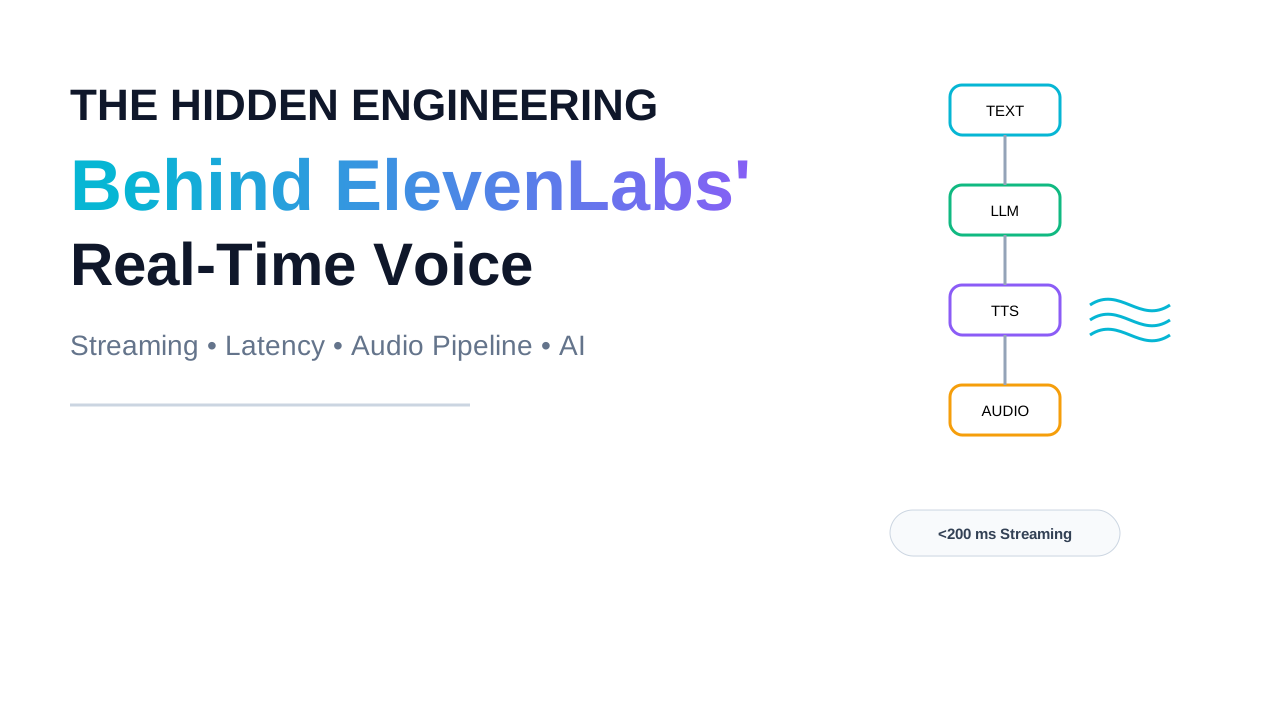
The solution exists. When an LLM generates tokens, you can forward them to the TTS WebSocket as they arrive, and audio begins playing before the LLM has even finished its response. Done correctly, this architecture compresses a 1,300ms wait into a time-to-first-audio under 200 milliseconds. The difference isn’t a 7x speed improvement — it’s the difference between a voice assistant that feels alive and one that feels like it’s loading.
This article is the complete engineering breakdown of how that works. We’ll start from the physics of audio that makes streaming necessary, trace every stage of ElevenLabs’ streaming pipeline, understand the specific trade-offs embedded in chunk_length_schedule and auto_mode, connect the TTS layer to the full LLM-to-voice pipeline it sits inside, and build a production-grade implementation with all the handling that tutorials leave out. By the end you’ll understand not just how to use the streaming API but exactly why it’s structured the way it is and how to tune it for your specific latency and quality requirements.
Phase 1: The Problem — Why Voice AI Can’t Wait
Audio Generation Is Computationally Sequential, But Playback Doesn’t Have to Be
To understand why streaming is so important for voice, you need to understand something about the nature of audio that makes it different from almost every other type of data.
Audio is inherently time-sequential. A 5-second audio clip contains exactly 5 seconds of sound — not more, not less, regardless of how fast your computer can read the file. This means that playback has an irreducible minimum duration, and more importantly, playback can begin before the file is complete, as long as you have enough of a head start. A video player doesn’t download the entire movie before it starts — it buffers the first few seconds and begins playing while downloading the rest. A voice AI system can do exactly the same thing: begin playing the first fraction of a second of generated speech while the rest is still being synthesized.
The naive REST API call defeats this possibility entirely. By waiting for the complete audio response before playing anything, you’re introducing a completely unnecessary delay that correlates with total audio length — the longer the sentence, the longer you wait. For a 10-word response that takes 2 seconds to synthesize, you wait 2 seconds. For a 40-word response that takes 5 seconds to synthesize, you wait 5 seconds. The wait scales linearly with length, which means it gets worse exactly when your users are receiving the most information — during long, detailed, helpful responses.
The Three Sources of Latency in a TTS Pipeline
Understanding latency requires separating its three distinct sources, because they have different engineering solutions and different magnitudes.
Model inference latency is the time the neural network takes to actually synthesize speech from text. For ElevenLabs, the ~75ms Flash latency and the higher-quality output of Eleven v3 are both consequences of deliberate architectural choices. Flash v2.5 is positioned as the ultra-fast option, with ElevenLabs latency optimization documentation claiming ~75ms inference speeds. Turbo v2.5 offers ~250-300ms latency with better quality. These numbers represent the model computation time only, measured in isolation at the server.
Network latency is the round-trip time for requests and data to travel between your server and ElevenLabs’ infrastructure. This is entirely outside ElevenLabs’ control and is determined by geography. Streaming REST API with PCM format provides the best time-to-first-byte at 478ms average from India. The model might synthesize in 75ms, but if you’re 400ms away from the inference endpoint, the network overhead dominates completely. This is why ElevenLabs announced plans for APAC data centres in late 2025 — geographic expansion addresses network latency in a way that model optimization cannot.
Application pipeline latency is everything that happens in your code: parsing the request, constructing the TTS API call, handling the response, and getting audio to the playback system. In a voice agent where the user’s speech is first transcribed (adding 100-200ms), then processed by an LLM (adding 300-500ms), then synthesized to voice, the full path might be: speech recognition → LLM → TTS → audio playback, with each stage contributing its own latency. The LLM’s latency is part of the chain, and its contribution dwarfs the TTS latency for most production workloads.
The key insight that changes everything: model inference latency and network latency overlap with playback in a streaming architecture. If you start playing audio the moment the first audio bytes arrive, you’re playing audio while subsequent bytes are still being synthesized and transmitted. The perceived latency drops to time-to-first-audio-byte rather than time-to-complete-audio — an entirely different, much more favorable number.
Why HTTP Streaming Isn’t Enough, and Why WebSockets Are Different
The first improvement most engineers reach for is HTTP streaming — the streaming REST API that sends audio bytes as they’re generated rather than buffering the complete file. This is substantially better than the naive batch approach: you begin playback as soon as the first chunk arrives, and latency drops from “synthesis time + network round trip” to “time to first chunk + network for first chunk.” For applications where the text is fully available before the TTS call (you have the complete message ready to send), HTTP streaming is often the right choice.
But for voice agent applications — where an LLM is generating the text you want to speak, token by token, at the same time you’re synthesizing it — HTTP streaming’s unidirectional nature becomes a fundamental limitation. An HTTP streaming response requires you to send the complete request before receiving any response. To stream LLM output directly to TTS, you’d need to buffer all LLM tokens, wait until you have a complete sentence or message, then start the HTTP streaming TTS call. That buffering re-introduces exactly the kind of latency you were trying to eliminate.
WebSocket streaming enables bidirectional communication. You can send text incrementally, word by word or sentence by sentence, and the model begins generating before the full input is available. This is what makes end-to-end low-latency voice pipelines possible: an LLM generates tokens, you forward them to the TTS WebSocket as they arrive, and audio begins playing before the LLM has even finished its response.
WebSockets are persistent, bidirectional connections. You open one connection, send text fragments as they become available, and receive audio chunks as they’re synthesized — all over the same connection, without the overhead of establishing new HTTP connections for each exchange. This is the architectural primitive that makes genuinely low-latency voice AI possible, and the rest of this article is about how ElevenLabs uses it.
Phase 2: The Mental Model
Think of It Like a Kitchen, Not a Vending Machine
A vending machine requires you to wait until the entire product drops before you can touch it. A restaurant kitchen works differently: a great kitchen starts plating the moment the first component is ready. The appetizer leaves the moment it’s done. The main course follows. You’re eating course one while course two is still being cooked. The total experience is faster and more satisfying, even though the total preparation time is the same.
A batch TTS call is a vending machine: wait for the complete audio to drop before touching any of it. A WebSocket streaming TTS pipeline is a kitchen: begin consuming audio the instant the first chunk is synthesized, while subsequent chunks are still being generated.
The parallel extends to the crucial engineering decision that chefs face constantly: how much food should be plated before sending it out? Send the first bite of steak the moment it comes off the grill, and the temperature and presentation suffer. Wait until the entire dish is perfectly composed, and the kitchen loses its speed advantage. Find the right batch — enough to serve a coherent, enjoyable bite without waiting for everything — and you get both quality and speed.
This is exactly the engineering problem that chunk_length_schedule solves in ElevenLabs’ streaming API, and it’s worth understanding as a design principle before we look at the technical mechanics.
The Quality-Latency Trade-off Is Real and Architectural
This is a genuine tradeoff, not a technical limitation that will eventually go away. When a TTS model synthesizes speech, it needs some amount of text ahead to make good prosody decisions — the rise and fall of pitch, the rhythm of emphasis, the natural pause at a comma. If you synthesize “I think the most important” before you know whether the next word is “thing” or “dangerous factor,” you’re committing to prosody for a clause the model hasn’t seen yet. The result can sound unnatural at the commit point — a subtle but perceptible glitch in an otherwise natural-sounding sentence.
Synthesizing longer chunks — more characters before committing — gives the model better prosodic context and produces more natural output. But it adds latency to first audio, because you’re waiting for more text to accumulate before the first generation begins. Synthesizing shorter chunks reduces latency to first audio but potentially degrades prosody at chunk boundaries.
The WebSocket approach introduces more complexity. The model needs to decide when to commit to generating audio: too early and it may produce unnatural prosody at phrase boundaries; too late and latency suffers. This is controlled through chunk schedules and the auto_mode setting, which handles this tradeoff automatically for most use cases.
Understanding that this trade-off is architectural — not a bug that will be optimized away — is the mental model that makes all of ElevenLabs’ configuration parameters interpretable as deliberate design choices rather than arbitrary knobs.
The Latency Budget Framework
Before touching any configuration, a voice AI engineer needs to establish a latency budget — the total delay the user experiences from their last word to the first audio of the response, and what portion of that budget is allocated to each stage.
For a conversational voice agent:
Total budget: 500ms (threshold above which users perceive lag)

Stage 1 — Speech Recognition (ASR):      ~150ms
Stage 2 — LLM First Token:               ~200ms
Stage 3 — TTS Time-to-First-Audio:       ~150ms
                                          ─────
Total:                                    500ms
That 150ms budget for TTS time-to-first-audio is tight. ElevenLabs’ Flash v2.5 achieves ~75ms inference time, leaving 75ms for network and application overhead. Achieving this from a co-located server with access to a US/EU ElevenLabs endpoint is realistic. From Southeast Asia with APAC latency, it’s essentially impossible on that timeline today.
The budget framework makes configuration decisions obvious: if your latency budget is generous (say, 300ms for TTS), you can afford larger chunks and better prosody. If your budget is tight (100ms for TTS), you need to accept smaller chunks and some prosody degradation in exchange for speed. The budget, not a vendor’s default settings, should drive your configuration choices.
Phase 3: Internal Working Deep Dive — The Full Streaming Pipeline
Opening the WebSocket Connection
The ElevenLabs streaming TTS pipeline begins with a WebSocket handshake to the text-to-speech streaming endpoint. This is not a standard HTTP request — it’s a protocol upgrade that establishes a persistent, bidirectional TCP connection that remains open for the duration of the voice exchange. The endpoint accepts query parameters specifying the voice ID, the model (eleven_flash_v2_5 for minimum latency, turbo_v2_5 for higher quality), and the output format.
The choice of output format is an engineering decision that most tutorials gloss over and deserves precise treatment.
PCM (Pulse Code Modulation) is raw, uncompressed audio samples. At 16-bit depth and 22,050 Hz sampling rate, PCM consumes approximately 352 KB per second of audio. It requires zero decompression on the client — samples can be fed directly to an audio output buffer — making it the lowest-latency playback format. ElevenLabs offers PCM at multiple sample rates (16000, 22050, 24000, 44100 Hz). For telephony applications using standard 8kHz sampling, PCM at the lower rate is often the right choice. For high-quality assistant applications, 22050 or 24000 Hz PCM gives the best quality-latency balance.
MP3 applies perceptual audio compression, reducing file size by roughly 10:1 at 128 kbps while preserving most of what the human ear perceives. The trade-off is that MP3 decoders have a small but nonzero initial buffering requirement — an MP3 stream can’t start playing the moment the first byte arrives; it needs enough data to fill the codec’s initial frame. For most applications the difference is imperceptible, but in ultra-low-latency contexts, PCM’s zero-decompression advantage is real.
Opus is a modern audio codec designed specifically for real-time network transmission, used in WebRTC applications. It achieves better quality than MP3 at lower bitrates and handles packet loss gracefully. For applications using WebRTC for audio transport (a common pattern in telephony and browser-based voice), Opus is often the natural choice.
Streaming REST API with PCM format (pcm_22050) provides the best time-to-first-byte at 478ms average from India. This outperforms WebSocket streaming (711ms+) due to lower connection overhead over high-latency links. This counterintuitive result — streaming REST outperforming WebSocket from high-latency regions — happens because WebSocket connection establishment adds overhead that matters more when base network latency is already high. For low-latency networks (same region as the ElevenLabs endpoint), WebSocket outperforms streaming REST for the token-by-token use case.
The Chunk Schedule: Engineering the Commit Decision
Once the WebSocket is open, the client begins sending text. The critical engineering decision is: how much text should the model accumulate before beginning to synthesize the first audio chunk?
The chunk_length_schedule parameter, when either initializing the WebSocket connection or when sending text is an array of integers that represent the number of characters that will be sent to the model before generating audio.
An example like [120, 160, 250, 290] works as follows:
- First chunk: wait until 120 characters have been received, then synthesize
- Second chunk: wait until 160 additional characters, then synthesize
- Third chunk: wait until 250 more characters, then synthesize
- Subsequent chunks: wait for 290 characters each
The progression from smaller to larger chunks is deliberate: the first chunk uses fewer characters to minimize time-to-first-audio, accepting potentially slightly less natural prosody. Subsequent chunks use more characters, allowing the model to make better prosodic decisions with more context, producing progressively more natural-sounding output for the rest of the response. The user experiences a fast start with rapidly improving quality — exactly the perceptual trade-off you want.
The exact character counts that optimize this trade-off depend on your model choice and use case. Flash v2.5’s smaller architecture requires less context for acceptable prosody than Eleven v3’s larger architecture. Conversational short responses (20-50 words) benefit from smaller schedules. Long, complex informational responses benefit from larger schedules that allow the model to process complete clauses before committing.
Setting auto_mode to true automatically handles generation triggers, removing the need to manually manage chunk strategies. If auto_mode is disabled, the model will wait for enough text to match the chunk schedule before starting to generate audio. For instance, if you set a chunk schedule of 125 characters but only 50 arrive, the model stalls until additional characters come in — potentially increasing latency.
auto_mode is particularly important when feeding sentence-complete text (where you know you’re sending complete thoughts and can rely on sentence boundaries as natural commit points) versus token-by-token streaming (where the model needs to decide how to buffer incomplete sentences). Auto mode is automatically enabled for SENTENCE aggregation and disabled for TOKEN aggregation — because token streaming relies on the server-side chunk scheduler to accumulate enough text for natural-sounding synthesis.
The Synthesis Pipeline Inside ElevenLabs
When the model receives enough text to satisfy the chunk schedule, synthesis begins. The internal pipeline involves a neural TTS model — an architecture descended from neural vocoder research (WaveNet, WaveRNN, and their successors) — that converts a text representation into acoustic features and then into audio waveform samples.
The key property that makes streaming possible at the neural level is that the model generates audio in frames or segments — short fixed-duration chunks of waveform samples — rather than producing the complete audio in one monolithic operation. As soon as the first frame is complete, it can be sent to the client without waiting for the rest. The server maintains a generation buffer and streams frames as they’re produced by the model, maintaining a small internal buffer (typically one or two frames ahead) to smooth over any model computation variance without introducing perceptible stutter.
At Flash v2.5’s ~75ms inference claim, the model is generating several hundred milliseconds of audio in under 75ms — a generation speed ratio (audio duration ÷ compute time) of roughly 5-10x, meaning synthesis runs substantially faster than real time, which is what makes streaming with minimal buffering viable. If synthesis ran at 1:1 real time, any transmission hiccup would immediately cause a playback gap. The speed ratio provides the margin that makes reliable streaming possible.
Audio Delivery and the Receiving Pipeline
On the client side, received audio chunks arrive as binary WebSocket frames. Each frame contains a buffer of audio samples in the specified format. The receiving application has several responsibilities that are easy to get wrong.
Ordering guarantee. WebSocket operates over TCP, which guarantees in-order delivery of bytes within a single connection. Unlike UDP-based protocols where packets can arrive out of order and require resequencing, you don’t need to implement reordering for ElevenLabs WebSocket audio. The samples arrive in chronological order and can be fed directly to the playback buffer.
Jitter buffer management. Even with TCP’s ordering guarantees, network jitter — variation in packet arrival timing — can cause the audio buffer to occasionally underrun before new samples arrive. A production audio player maintains a jitter buffer: a small queue of pre-received audio that provides padding against network timing variation. The buffer size trades latency for reliability: a 100ms jitter buffer absorbs more timing variance at the cost of 100ms of additional start delay.
Back-pressure handling. Your audio output device consumes samples at a fixed rate (the sample rate). If audio chunks arrive faster than playback consumes them, the buffer fills. If they arrive slower, the buffer underruns and playback glitches. A production implementation monitors buffer occupancy and signals the sending side (or the user interface) when the buffer is critically low — though with a 5-10x synthesis speed ratio, underrun during normal operation is rare without unusual network conditions.
The Flush Operation: Forcing Generation Before the Buffer Fills
A critical feature for interactive applications is the ability to force audio generation without waiting for the chunk schedule to be satisfied. If your LLM generates only 40 characters for a complete response (a short “Yes, of course” type answer), and your chunk schedule requires 120 characters before the first synthesis, you’ll wait indefinitely for characters that will never come.
The solution is an explicit flush: sending an end-of-sequence signal that tells the server “no more text is coming for this utterance; synthesize whatever you have immediately.” In ElevenLabs’ WebSocket API, this is done by sending an empty string or a specific end signal in the text field of the message. Flush is also important when you detect natural sentence boundaries in the LLM output — at a period or question mark, you can flush immediately rather than waiting for the chunk schedule to fill, allowing synthesis of a complete grammatical unit that will have good natural prosody.
The sentence-boundary flush pattern is one of the most important optimizations in a production voice pipeline: detect sentence-end punctuation in the LLM’s streaming output, immediately flush the accumulated text to ElevenLabs at each sentence boundary, and the model synthesizes complete sentences one at a time with near-optimal prosody and minimal accumulated latency.
Phase 4: Engineering Implementation
A Complete LLM-to-Voice Streaming Pipeline
Here’s a production-shaped implementation that pipes an Anthropic LLM’s streaming output directly into ElevenLabs’ WebSocket TTS, achieving the minimum-latency architecture described throughout this article.
import asyncio
import re
import websockets
import json
import anthropic

ELEVENLABS_API_KEY = "your-api-key"
ANTHROPIC_API_KEY  = "your-api-key"
VOICE_ID           = "21m00Tcm4TlvDq8ikWAM"  # Rachel
TTS_MODEL          = "eleven_flash_v2_5"

EL_WS_URL = (
    f"wss://api.elevenlabs.io/v1/text-to-speech/{VOICE_ID}/stream-input"
    f"?model_id={TTS_MODEL}"
    f"&output_format=pcm_22050"
    f"&optimize_streaming_latency=4"  # max latency optimization level
)


async def run_voice_pipeline(user_message: str, audio_callback) -> None:
    """
    Streams an Anthropic LLM response directly to ElevenLabs TTS.
    Calls audio_callback(bytes) with each received audio chunk.
    """
    anthropic_client = anthropic.AsyncAnthropic(api_key=ANTHROPIC_API_KEY)

    async with websockets.connect(
        EL_WS_URL,
        extra_headers={"xi-api-key": ELEVENLABS_API_KEY},
    ) as ws:

        # Initial handshake — tells ElevenLabs our chunk schedule
        await ws.send(json.dumps({
            "text": " ",  # ElevenLabs requires a non-empty initial message
            "voice_settings": {
                "stability":        0.5,
                "similarity_boost": 0.8,
                "use_speaker_boost": True,
            },
            "generation_config": {
                "chunk_length_schedule": [120, 160, 250],
            },
        }))

        # Run both send and receive concurrently — this is the key to
        # genuine end-to-end streaming. We're sending LLM tokens to
        # ElevenLabs at the same time we're receiving synthesized audio back.
        await asyncio.gather(
            _stream_llm_to_elevenlabs(anthropic_client, user_message, ws),
            _receive_audio(ws, audio_callback),
        )


async def _stream_llm_to_elevenlabs(
    client: anthropic.AsyncAnthropic,
    user_message: str,
    ws,
) -> None:
    """
    Streams Anthropic output token by token to the ElevenLabs WebSocket.
    Flushes immediately at sentence boundaries for best prosody-latency balance.
    """
    sentence_pattern = re.compile(r'[.!?]\s')
    buffer = ""

    async with client.messages.stream(
        model="claude-sonnet-4-6",
        max_tokens=1024,
        messages=[{"role": "user", "content": user_message}],
    ) as stream:
        async for text in stream.text_stream:
            buffer += text

            # Detect sentence boundary — flush immediately for good prosody.
            # This is better than waiting for the chunk schedule to fill on
            # a natural sentence boundary, because the model has complete
            # context for the prosody decision.
            if sentence_pattern.search(buffer):
                await ws.send(json.dumps({
                    "text": buffer,
                    "flush": True,  # synthesize immediately, don't wait for schedule
                }))
                buffer = ""
            elif len(buffer) >= 50:
                # Send accumulated text without flushing — let the chunk
                # schedule decide when to synthesize.
                await ws.send(json.dumps({"text": buffer}))
                buffer = ""

    # Flush any remaining text at the end of the LLM response.
    if buffer:
        await ws.send(json.dumps({"text": buffer, "flush": True}))

    # Signal end of input. ElevenLabs will finalize and close after this.
    await ws.send(json.dumps({"text": ""}))


async def _receive_audio(ws, audio_callback) -> None:
    """
    Receives audio chunks from ElevenLabs and passes them to the callback.
    Handles both audio data and metadata messages.
    """
    async for message in ws:
        if isinstance(message, bytes):
            # Raw PCM audio bytes — pass directly to playback
            audio_callback(message)
        else:
            # JSON metadata message (alignment info, isFinal, etc.)
            data = json.loads(message)
            if data.get("isFinal"):
                break  # ElevenLabs signals it's done
Why asyncio.gather for send and receive. This is the single most important structural decision in this implementation. Running the LLM streaming and the audio receiving concurrently — not sequentially — is what achieves end-to-end streaming. If you awaited the LLM streaming completion before starting to receive audio, you’d be back to batch behavior. asyncio.gather launches both coroutines simultaneously, so audio begins arriving from ElevenLabs while the LLM is still generating text.
Why flush at sentence boundaries. A flush at a period or question mark signals to ElevenLabs “synthesize this immediately — this is a complete thought.” Without the explicit flush, ElevenLabs would wait for the chunk schedule threshold (120 characters in our example) even when a complete sentence of 60 characters is ready to synthesize. The sentence-boundary flush gives the model exactly the right amount of context for prosody decisions — a complete grammatical unit — while minimizing accumulated latency.
Why the " " initial message. This is a quirk of ElevenLabs’ WebSocket protocol: the connection initialization message must contain a non-empty text field, but that text will be included in the audio if it’s content. A single space satisfies the protocol requirement without producing audible output in the generated audio.
Connecting to a Playback System
The audio_callback in the implementation above receives raw PCM bytes. How those bytes reach a speaker depends on your application context:
import pyaudio

def build_audio_callback():
    """
    Builds a callback that streams PCM audio to the system's audio output.
    """
    pa = pyaudio.PyAudio()
    stream = pa.open(
        format=pyaudio.paInt16,
        channels=1,
        rate=22050,
        output=True,
        frames_per_buffer=1024,  # ~46ms of audio per buffer write
    )

    def callback(pcm_bytes: bytes) -> None:
        # Write PCM bytes directly to the audio output buffer.
        # PyAudio handles the DAC conversion and speaker output.
        stream.write(pcm_bytes)

    return callback, stream, pa
For a browser-based application, received audio chunks would be passed to the Web Audio API’s AudioContext for playback. For telephony applications (Twilio, Vonage), PCM bytes are typically forwarded over WebRTC or a media stream to the phone carrier’s infrastructure. The audio_callback abstraction keeps the TTS pipeline clean regardless of the playback target.
Handling Production Failure Modes
The implementation above handles the happy path. Production requires three specific failure-handling additions that tutorials consistently omit.
WebSocket reconnection. WebSocket connections drop. Network hiccups, server-side maintenance, and timeout policies all terminate connections unexpectedly. A production implementation wraps the WebSocket logic in a retry loop with exponential backoff, re-establishing the connection and resuming audio generation from wherever the LLM stream left off.
Buffer underrun detection. If the client’s audio playback buffer empties before new audio arrives, the user hears a click or silence. A production player monitors buffer occupancy and immediately logs underruns — a persistent underrun rate above 0.1% indicates a network condition or server-side latency issue that needs investigation.
LLM timeout handling. If the LLM takes unusually long to generate first tokens (a cold start, a cluster issue), the ElevenLabs WebSocket can time out waiting for text. A production implementation sets a watchdog timer: if no text has been sent to ElevenLabs within 3 seconds of opening the connection, close and retry rather than holding an open connection indefinitely.
Common Implementation Mistakes
Sending the complete LLM response as one text message. This defeats the entire purpose of WebSocket streaming — ElevenLabs can’t synthesize the beginning while the end is still loading if the whole thing arrives at once. Text must be sent in fragments as the LLM generates them.
Not flushing at natural boundaries. Relying solely on the chunk schedule without explicit flushes means short responses (under the chunk schedule threshold) wait forever for characters that never come, and longer responses miss natural prosody opportunities at sentence boundaries.
Choosing audio format for quality without considering playback pipeline. MP3 at 192kbps sounds great, but if your downstream playback path requires a specific sample rate or format, you’ll add unnecessary conversion overhead. Choose the format that is natively compatible with your playback system.
Using a single synchronous thread for send and receive. Python’s async architecture is not optional here — synchronous code cannot interleave sending text and receiving audio efficiently. If you’re building in a language without first-class async, use threads with a concurrent queue for the bidirectional data flow.
Ignoring the isFinal message. ElevenLabs sends a JSON metadata message when synthesis is complete. Not handling it means your receive loop either hangs waiting for more frames or misses the clean termination signal and leaks the connection.
Phase 5: Real-World Systems
Pipecat: The Open Framework That Abstracts This Pipeline
Pipecat, an open-source voice AI framework from Daily.co, is the most mature open-source implementation of the LLM-to-TTS streaming pipeline described in this article. Pipecat’s ElevenLabs service provides text-to-speech using ElevenLabs’ streaming API with word-level timing. It supports both SENTENCE and TOKEN aggregation modes: SENTENCE buffers text until sentence boundaries, producing more natural speech; TOKEN streams tokens directly for lower latency. The trade-off between TOKEN and SENTENCE aggregation is precisely the flush-at-sentence-boundary decision covered in Phase 3, implemented as a configurable parameter rather than custom code.
Pipecat’s architecture shows how the pipeline abstracts into reusable components: a VAD (Voice Activity Detection) stage detects when the user finishes speaking, an ASR stage transcribes speech to text, an LLM stage generates the response with streaming output, a TTS stage converts to audio with the pipeline above, and a transport stage handles audio I/O. The streaming connections between stages are what give the pipeline its low end-to-end latency.
Telephony at Scale: Twilio and ElevenLabs
Twilio Media Streams, which delivers raw mulaw-encoded audio over WebSockets for phone calls, is one of the most common deployment targets for voice AI pipelines. The ElevenLabs integration for telephony requires converting ElevenLabs’ output format (PCM or MP3) to mulaw at 8kHz — the format Twilio’s infrastructure accepts. The conversion adds a small processing step but is computationally trivial. The more significant engineering consideration is the bidirectional latency requirement: phone users have even lower tolerance for lag than app users, because phone conversations have established expectations of near-zero-latency response. Building within the 400-500ms total budget for phone conversations requires aggressive optimization at every stage: Flash v2.5 for TTS, the fastest ASR available, and a LLM with sub-200ms first-token latency.
Real-Time Voice Agents at ElevenLabs Scale
ElevenLabs’ own Conversational AI product (formerly known as the Agents Platform) is built on top of the same WebSocket streaming infrastructure available to API users, with managed infrastructure handling the full ASR → LLM → TTS pipeline. What makes this architecture interesting from an engineering perspective is the latency budget allocation: ElevenLabs has co-located the ASR, LLM inference (using various model providers via API), and TTS within their own infrastructure, eliminating the network round-trips that dominate latency in distributed deployments. The product achieves its headline latency numbers specifically because all three stages run in a tightly co-located cluster rather than making cross-region API calls for each stage.
The Latency Numbers That Actually Matter in Production
Independent benchmark testing measured the 180ms gap between claimed inference and measured TTFB. If ASR takes 200ms and LLM inference takes 300ms, the total pipeline latency is approximately:
| Stage | Optimistic | Realistic (US) | Realistic (APAC) |
|---|---|---|---|
| ASR | 100ms | 150ms | 250ms |
| LLM First Token | 150ms | 250ms | 300ms |
| TTS First Audio | 75ms | 200ms | 450ms |
| Audio Transmission | 20ms | 50ms | 100ms |
| Total | 345ms | 650ms | 1,100ms |
The “optimistic” column is co-location (all stages in the same data center). The “realistic US” column reflects production API calls with typical network latency from a US deployment. The “realistic APAC” column shows why geographic proximity to ElevenLabs’ inference infrastructure dominates the total budget in a way no model optimization can overcome. Regional endpoints, when they become available, will shift APAC realistic numbers toward the US realistic column.
Phase 6: AI Era Relevance — Voice as the New Interface Layer
Why This Matters for AI Agent Engineers
Voice is rapidly becoming the primary interface for AI agents in contexts where hands or screens are unavailable: customer service calls, in-car assistants, workplace voice interfaces, accessibility tools, and increasingly any conversational application where typing is slower than speaking. The streaming pipeline in this article is not a TTS feature — it’s the last-mile rendering layer for AI agents that operate through voice.
As AI agents become more capable and take on longer, more complex tasks, the voice interface faces a new challenge: how do you maintain conversational naturalness when the agent needs to think for 3 seconds? The answer emerging in production systems is turn-taking with filler audio — generating a brief “Let me look into that for you” within 200ms while the main response is being prepared, then interrupting the filler with the real response as soon as it’s ready. This requires the streaming architecture described here, plus interruptibility: the ability to stop in-progress audio generation when the agent’s actual response is ready. ElevenLabs’ WebSocket architecture supports this through connection termination followed by a new connection opening — not a graceful mid-stream interrupt, which remains an active development area across voice AI platforms.
The LLM-to-Voice Pipeline as Infrastructure
The architecture in this article — bidirectional WebSocket with sentence-boundary flushes and concurrent send/receive — is not specific to ElevenLabs. The same principles apply to any streaming TTS provider: Deepgram Aura, Google Cloud Text-to-Speech streaming, Azure Cognitive Services streaming TTS. Understanding the architecture at the level of why each component exists (bidirectionality for token-by-token input, chunk schedules for the quality-latency trade-off, flush for sentence boundaries, concurrent async for overlapping generation and playback) means you can implement and optimize it for any provider, evaluate provider trade-offs intelligently, and adapt to API changes without being surprised by their implications.
Phase 7: Advantages, Limitations, and Trade-offs
Why Streaming Beats Batch for Real-Time Voice
The latency improvement is the headline, but streaming has a second advantage that matters for long responses: it makes cancellation practical. If a user says “stop” or asks a follow-up question mid-response, a streaming architecture can immediately halt audio generation and processing. A batch approach that synthesized and transmitted a 30-second audio file before playing it would make interruption awkward — either you wait for the full synthesis before playing and can’t interrupt, or you play while receiving and need a more complex interrupt mechanism anyway.
Where Streaming Creates Real Engineering Complexity
Prosody across chunk boundaries is the core unsolved problem. Even with optimal chunk schedules, a TTS model committing to audio at a chunk boundary before seeing what comes after will occasionally produce an unnatural intonation that wouldn’t exist if it had seen the complete sentence. This is audible to careful listeners, particularly on lists, complex clauses, and compound sentences that the model couldn’t anticipate from the visible prefix. Auto-mode and sentence-boundary flushing both mitigate this significantly but don’t eliminate it entirely.
Stateful WebSocket connections are harder to scale than stateless HTTP. A WebSocket connection is pinned to a specific server for its duration. Load balancing WebSocket connections requires sticky sessions or connection-aware routing — not impossible, but materially more complex than stateless HTTP load balancing. At ElevenLabs’ scale, this is a non-trivial infrastructure challenge they’ve solved for API users, but teams building self-hosted TTS systems face this complexity directly.
Audio playback synchronization in multi-device or multi-speaker scenarios becomes genuinely complex when streaming. If a voice agent simultaneously sends audio to multiple clients (a conference room speaker system, for example), maintaining synchronized playback across participants requires either a broadcast streaming architecture or secondary synchronization protocol that doesn’t exist in the standard WebSocket model.
Phase 8: Career Impact & Future
The Engineering Stack This Opens
Understanding real-time audio streaming at the level of this article opens a specific and growing category of engineering work: voice AI infrastructure. The developers capable of building, optimizing, and maintaining production voice AI pipelines — with all the latency, audio format, buffering, and failure-handling considerations covered here — are genuinely rare relative to demand. This is partly because voice AI is newer than text AI, partly because the real-time streaming layer involves a different mental model from typical API integration work, and partly because the debugging environment for audio issues (jitter buffers underrunning, format conversion artifacts, WebSocket drops during synthesis) requires experience that takes time to accumulate.
The natural career positions for this knowledge: AI Platform Engineer at companies building voice products, Voice AI Infrastructure Engineer at companies scaling customer-facing voice agents, Senior Backend Engineer at companies where voice is a primary user interface layer. These roles increasingly ask interview candidates to design a low-latency voice pipeline from first principles — exactly what this article walked through.
Where Voice AI Infrastructure Is Heading
Several trends are converging that will change the architecture described here over the next few years. Regional inference deployment will solve the geographic latency problem that currently dominates TTFB numbers from high-latency regions. On-device TTS for shorter, simpler utterances (with models like Kokoro-82M achieving sub-300ms latency on consumer hardware) will create a hybrid architecture where simple confirmations run locally and complex, high-quality voice is generated server-side. Interruption handling will become a first-class API feature rather than requiring application-level WebSocket management. And voice-specific model architectures designed explicitly for streaming — generating audio in real time rather than batch — will further compress the latency budget, particularly for longer responses where current models’ front-loaded quality benefit from the complete text becomes a latency liability.
The Pipeline Is the Product
Voice AI systems are often described in terms of their voice quality — how natural the voice sounds, how well it clones a specific speaker, how accurately it handles pronunciation. Voice quality matters, but it’s the ambient layer that users notice only when it fails. What users actually experience as “good” or “bad” in a voice AI conversation is the rhythm: does it feel like a real conversation, or does it feel like an AI that’s buffering?
That rhythm is entirely a pipeline engineering problem. The best voice model in the world running in a batch architecture feels slower and more artificial than a modestly capable model running in a properly implemented streaming pipeline. The architecture in this article — LLM token streaming forwarded directly to a WebSocket TTS connection, with sentence-boundary flushes, concurrent async I/O, and appropriate chunk scheduling — is what gives a voice AI system the conversational feel that makes users forget they’re talking to software.
Understanding it at this level means you’re no longer just a consumer of voice AI APIs. You’re an engineer who can design the pipeline, tune the latency budget, debug the audio artifacts, and explain exactly why a change to the chunk schedule affected the user experience in a specific way. That engineering depth is what the voice AI industry is hiring for, and what will remain valuable as the platforms, models, and APIs all continue to evolve around the stable architecture principles covered here.
Also check: Why AI Agents Fail After 20 Minutes: Memory, Context, and Tool Architecture